


Divide Prospecting Zones Among the Brokers on Your Team
Maptive shades each ZIP or submarket by the target buildings and inquiry volume inside it, then helps you group and balance those zones across everyone canvassing.
No credit card required
- Plot your owner and building list from a CoStar export or your CRM, colored by property type.
- Shade ZIP codes by how many target buildings each one holds before you assign any of them.
- Add up inbound inquiries from listing sites and your own website by ZIP to see where requests cluster.
- Group ZIPs into named regions like East and South, then split each region among the brokers who canvass it.
- Balance zones on target buildings or inquiry volume, with a floor and ceiling per broker that you set.
- Save the ZIPs behind every zone as a list for your CRM’s assignment rules, so inquiries reach the broker who owns them.
Trusted by teams at









Count the Buildings Behind Every Line
Maptive helped us go beyond geography. The flexible analysis tools help us manage in ways beyond getting from point to point.
From Owner List to Assigned Turf in Maptive
- 1
Plot Targets and Inquiries
Start a sheet that lists every target building on its own row, with the address, owner, property type and a Buildings column set to 1. For inbound routing, add one row per ZIP with last year’s listing-site and website inquiries in a Projected Inquiries column, adjusted for listings you expect to win or lose. Bring the sheet into Maptive and color the buildings by property type.
- 2
Sketch Regions First
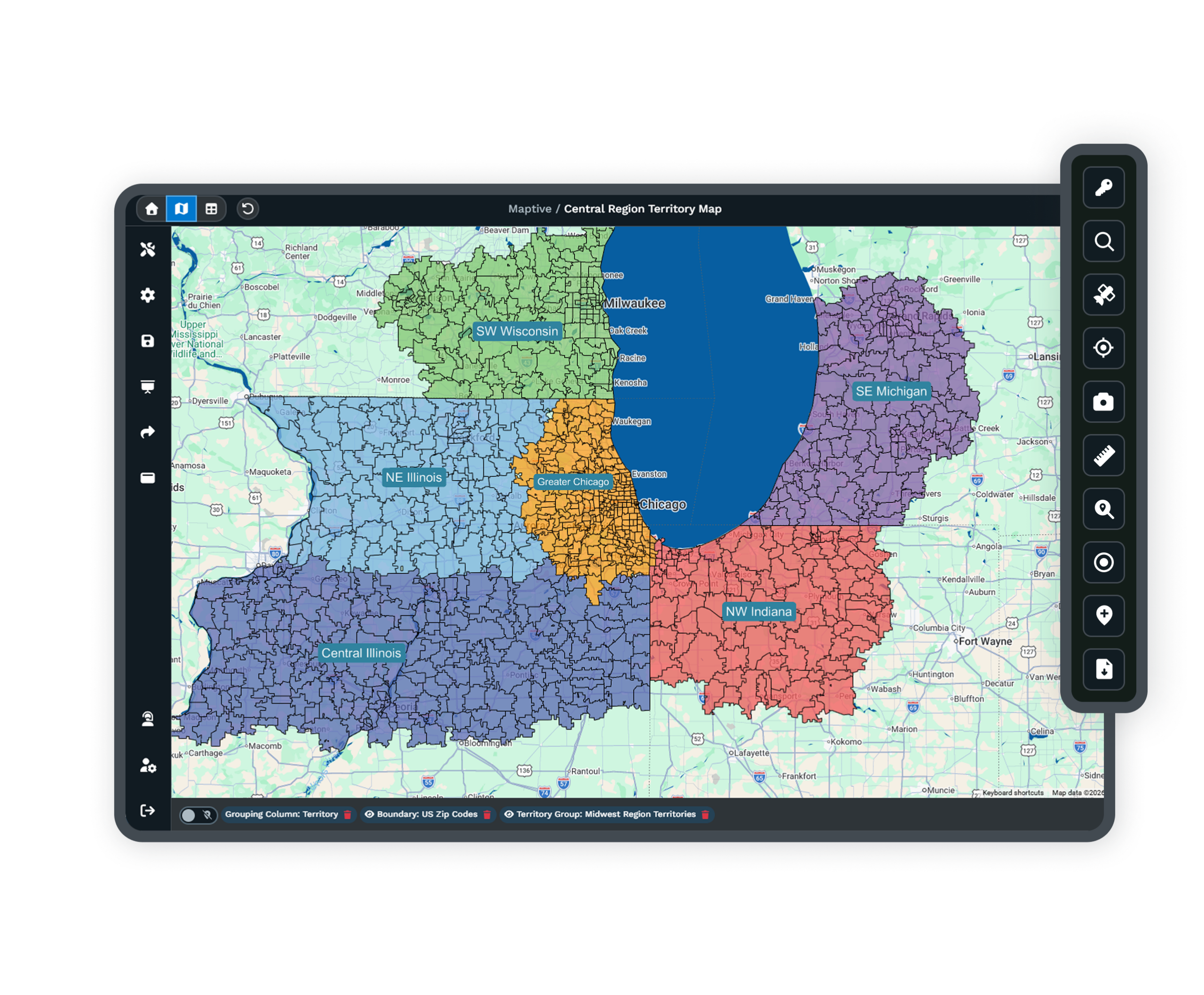
In Map Tools, open Territories and choose Create Territories Manually with the Selection method. Load ZIP Codes, then click ZIPs into named regions such as East and South, or lasso a whole corridor with Full and Partial Boundaries. Check each region’s building count and projected inquiries, which tells you how many brokers it can support before anyone gets a zone.
- 3
Even Out the Workload
For a larger team, open the Auto Territory Builder with ZIP Codes as its boundary type. Under Data Metrics, tick the Buildings and Projected Inquiries columns and use the importance slider to decide which counts for more. Set the territory count to your broker headcount, or give each zone a floor and ceiling with Optimize with Constraints, then click Generate Territory.
- 4
Hand Off ZIP Lists
Draw the Lasso Tool over each finished zone and choose Export Boundaries to get the ZIPs inside it. Load those ZIPs into the rules your CRM uses to assign new inquiries, and tag each building with its broker through Batch Edit so call lists line up with the map. A view-only link lets every broker check where their zone ends.
Map Your Coverage Free for 10 Days
Upload your target buildings and inquiry history during a free 10-day trial with no credit card. A Maptive specialist can help you set up and balance the first zones on a demo.
No credit card required
Frequently Asked Questions
How do I divide prospecting territories among brokers on my team?
Group ZIPs until every broker has a similar number of target buildings, then adjust for inbound inquiry volume. Dense ZIPs may need to be split between brokers, and ZIPs with few targets can be grouped into larger zones. Name each zone after the broker who owns it so call lists and the map use the same labels. Before you publish the zones, agree on who gets the call when an owner in one zone also holds a building in another.
Should I split territories by geography or by property type?
Most teams use a mix. A geographic zone lets a broker learn every building in a submarket, down to the owner and the lease dates, and that local file helps win listings. A property-type specialist knows the buyers and pricing for one asset class across a wider area. Some firms also split work by client type. In Maptive you can build a separate territory group for each property type on one map and color owners by type to keep them apart.
How do I route LoopNet, Crexi and website inquiries to the right broker?
Route them by the ZIP of the property the inquiry is about. Inquiries from listing sites usually arrive as emails or synced CRM records, and many CRMs can assign a new record by ZIP or city once you give them the list. Maptive produces that list for each zone. Inquiries on the team’s own listings usually stay with the listing broker, so set that rule first and use the ZIP rule for everything else. Recheck the rules after every rebalance so a moved ZIP doesn’t keep sending inquiries to its old owner.
How do I project inquiry volume for each zone?
Start from last year’s inbound inquiries by property ZIP, counted from your CRM. Then raise or lower each ZIP’s count for listings the team is likely to gain or drop, since one active listing can change a ZIP’s volume. Maptive does not supply inquiry data, so the projection is your own column, and Maptive totals it for every zone. The market data in the app includes counts of local businesses and workers by industry, which shows where business activity is concentrated.
How many buildings or owners should each broker cover?
No published ratio fits every team, so set the number from how your brokers work. A broker who keeps a detailed file on every building needs a smaller set than one working through an owner call list. Take the building counts of brokers whose files stay current as your range, and enter that range in Optimize with Constraints so every zone is sized to fit. Check the numbers again after a quarter of call results and adjust the range if some zones turn up far more active owners than others.
How do I keep two brokers from calling the same owner?
Give each building one broker and record it on the building itself. Within one territory group, Maptive keeps each ZIP in a single territory, so moving a ZIP into one broker’s zone takes it out of the other. Use Batch Edit on a broker column for the buildings inside each zone so the call lists you export match the lines. Owners with properties in several zones are the usual source of double calls, so decide up front if the relationship follows the owner or the building, and write that rule down for the team.
When should a brokerage rebalance its prospecting zones?
Rebalance when a broker joins or leaves, and at a set review each quarter or half year. When someone leaves, their owners need a new broker soon so follow-ups don’t lapse. Rebuild from your current layout with Respect Previous Territories switched on, and the builder changes only the zones outside your range. Most brokers keep the owners they already know and call, and only the zones that need a change move.
Can Maptive send zone assignments to my CRM?
Maptive builds the ZIP lists and broker columns, and you load them into your CRM. Export each zone’s ZIPs from the Lasso Tool, or save your building data with its broker column as an .xlsx or .csv file and import it. Every paid plan includes a REST API for teams that want to script the handoff. Maptive does not change assignment rules inside other systems, so the last step stays with whoever manages your CRM. Include the record ID from your CRM in the upload so the broker column imports back onto the right records.
Can I build zones by submarket instead of ZIP?
Yes, by drawing them. Submarket boundaries from research providers rarely follow ZIP codes, so the Territory Drawing Tool lets you trace each one by clicking points along the roads or rail lines that define it. Give each shape the submarket name your brokers already use in reports. If your building list has a submarket column, color the markers by it first so you can see where to trace. For coverage across a whole metro, group counties into regions instead.
Does Maptive provide owner or property data?
No. Ownership records and sale history come from sources your team already uses, such as a CoStar export or county assessor records. Maptive adds the map work and its own data on each area, including census demographics and local business counts, which help you judge where tenant demand is strong. Bring in only the columns your brokers need for calling, since a lean file is easier to keep current after every rebalance.








