


Field Service Mapping Software
Maptive helps you dispatch technicians, balance service territories, and hold your response windows. Plot work orders, route the day on real roads, and send turn-by-turn directions to every tech.
No credit card required
- Route techs through the day
- Balance territories by workload
- Drive-time dispatch zones
- Map jobs, assets & customers
- Turn-by-turn on mobile
- Cut windshield time
- Route techs through the day
- Balance territories by workload
- Drive-time dispatch zones
- Map jobs, assets & customers
- Turn-by-turn on mobile
- Cut windshield time
Trusted by teams at
















The Field-Service Payoff
Routing each technician on real roads fits more jobs into the same working hours.
Tighter routes and balanced territories trim the miles between jobs across the fleet.
Route optimization sequences a full day of jobs and exports turn-by-turn directions to a phone.
Tools for the Dispatch Board
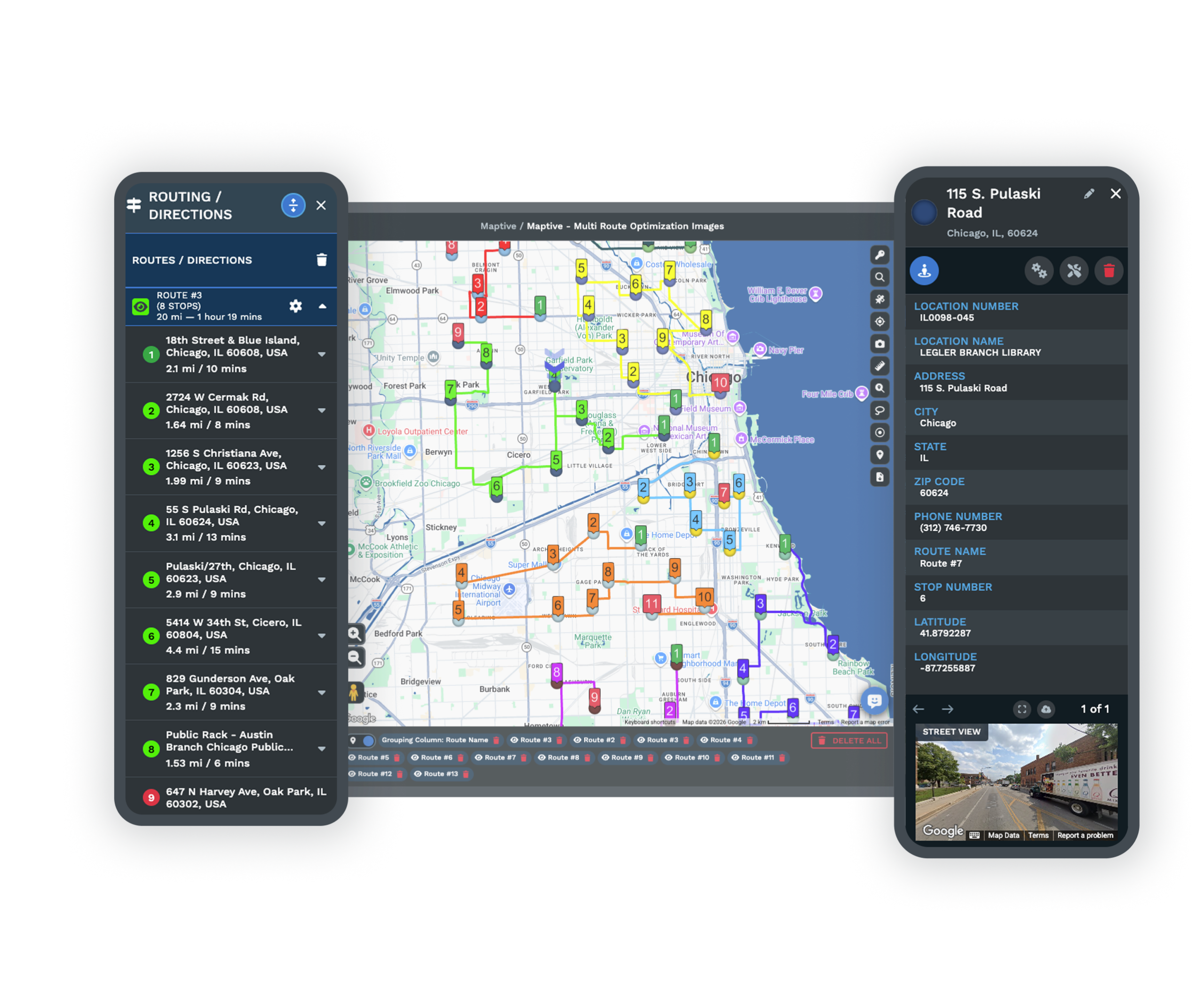
| 01 | Technician Route OptimizationSequence up to 73 stops per technician on real road networks to minimize travel time, then export turn-by-turn directions to a phone. Drag a job to reorder and the route updates in place. |
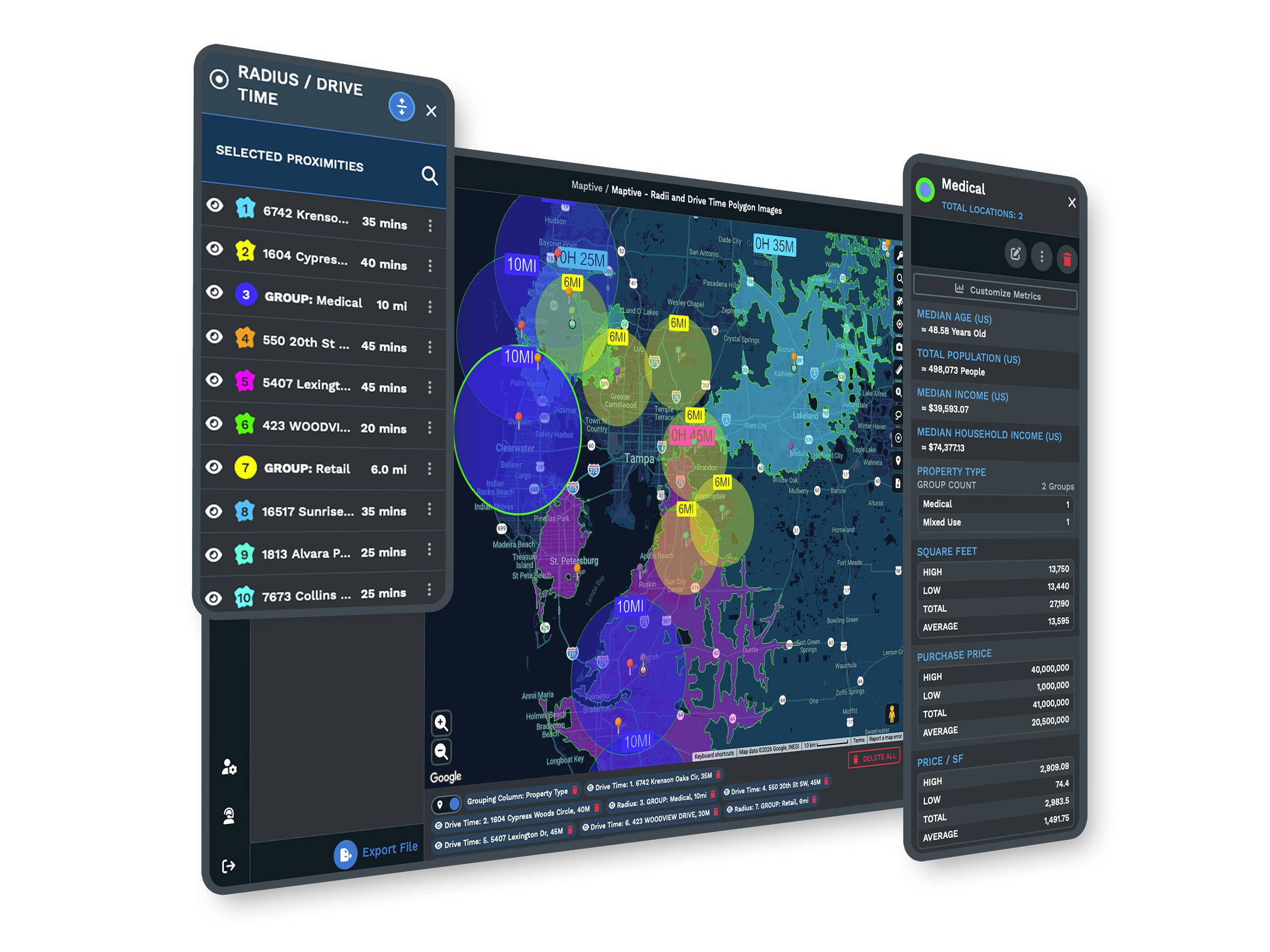
| 02 | Drive-Time Coverage ChecksDraw drive-time polygons around each technician or depot to see how far they reach within a response window. The gaps show where coverage is thin and where the next hire belongs. |
| 03 | Nearest-Tech LookupThe location finder ranks the closest technicians to a job by distance, with the route to each. Dispatch follows the drive that is genuinely fastest, then makes the final call. |
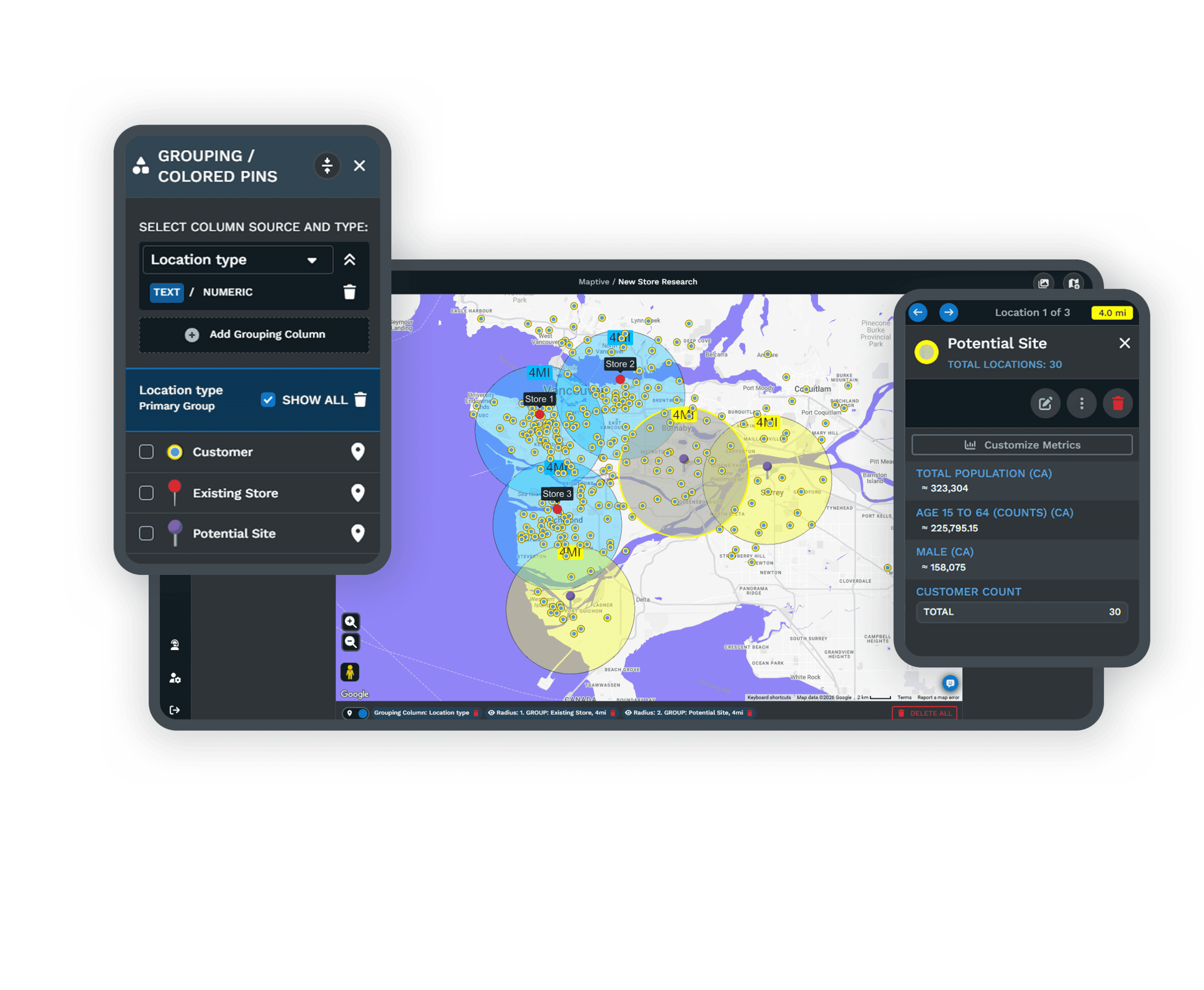
| 04 | Service Territory BalancingThe optimizer builds even technician territories from job density, drive-time limits, and skills. A zone that outgrows its tech gets rebalanced before windows start slipping. |
| 05 | Role-Based Field AccessEach technician sees only their own jobs and route, while managers keep full visibility. The interface stays focused and customer records stay protected across a large team. |
Running the Service Day
Building the Day on Real Roads
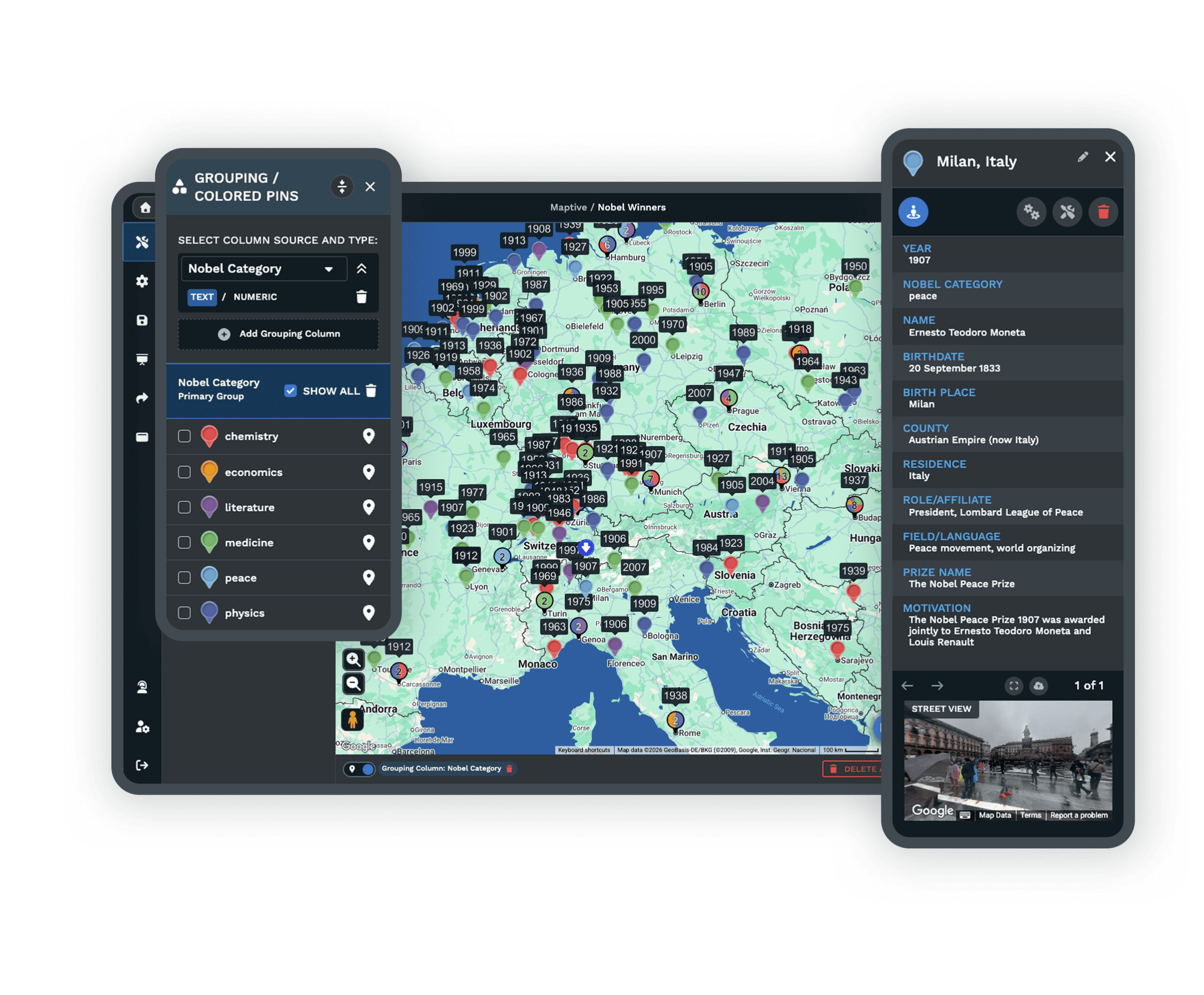
A four-hour window means little when the next job is ninety minutes away and the route was drawn in a spreadsheet. Maptive plots every work order and technician on one map and builds the day on real road networks, so the schedule follows the roads rather than a hopeful straight line. Every mile a technician drives is a mile they are not working, and routing the day on real roads rather than by hand fits more jobs into the same hours, which is where the lift in completed service calls comes from.
Holding the Window You Promised
Drive-time coverage shows which jobs fall inside a window and which do not before anyone is dispatched. A zone that grows faster than the others slowly overloads its technician, windows start slipping, and overtime climbs. Automated balancing recalculates against current job density whenever the inputs move, and scenario testing lets a manager split a territory or add a tech and see the workload effect before it goes live. The promise you sell stays in step with the drive your team faces.
Field Teams Across the Enterprise
Service Operations on Maptive
General Electric, Siemens, Bridgestone, and Esso run location and field work on the platform, each after its own security review. A regional crew and a national field force use the same tools, with capacity to scale.
Security for Field Teams
Maptive includes 256-bit SSL encryption, two-factor authentication, single sign-on, role-based access, and audit logging, with 99.9% uptime. It runs on Google Maps Platform infrastructure, so a national field operation stays responsive on one map.
Onboarding That Knows the Field
Support comes from the US and Canada, with replies in under 15 minutes, a 9.7 out of 10 rating, and hands-on help cleaning your work-order data and building your first map. The specialists understand dispatch and territory work.
Free trial, full platform, no credit card
Plan a Full Day of Jobs
Start a free ten-day trial, no credit card needed. Upload your work orders and technician list, route a full day, and draw drive-time coverage around your team. Every routing and territory tool is unlocked from the first login, so you can test a real schedule against your own data.
Walk Through Your Schedule With Us
For service teams that evaluate tools through a formal process, a Maptive specialist will run routing, coverage, and territory analysis on your own work orders and technicians. This suits operations leaders comparing platforms or needing sign-off before a trial. Bring a real schedule, and the session works through your operation rather than a sample.
Frequently Asked Questions
What is field service mapping software?
Field service mapping software plots work orders and technicians on a map and adds the routing and territory tools a service operation needs to run the day. Maptive sequences each technician's stops on real roads, draws drive-time coverage to check response windows, and balances territories across the team. Dispatchers and service managers use it to fit more jobs into a day, hold service-level promises, and see coverage gaps, all from a work-order list they upload as a spreadsheet.
How does Maptive help dispatch and route technicians?
You plot work orders and technicians on one map, and the routing engine sequences up to 73 stops per technician to minimize travel time, exporting turn-by-turn directions to a phone. The location finder ranks the nearest technician to an urgent job by distance, so dispatch can follow the drive that is genuinely fastest. When a job changes, you drag the stop and the route updates in place, which makes mid-day adjustments quick rather than a full reschedule.
How does drive-time coverage help meet service-level windows?
A drive-time polygon shows how far a technician or depot can travel within a set number of minutes along real roads. Maptive draws these around your team, so you can see which jobs fall inside a four-hour or same-day window before anyone is dispatched. That turns a service-level promise into something you can check on the map rather than discover in the field, and the gaps reveal where coverage is thin and where the next hire or depot belongs.
Can Maptive find the nearest available technician to a job?
Maptive's location finder ranks the closest technicians or sites to any job address by distance and shows the route to each. It identifies who is nearest geographically, which is the hardest part of a fast dispatch decision. It does not track live availability or auto-assign the work, so a dispatcher makes the final call using the ranked list. In practice that means you see the fastest options instantly and apply your own judgment about who is free.
Can Maptive balance technician territories?
Yes. The automated optimizer builds even technician territories from job density, drive-time limits, skills, and the data fields you upload, then rebalances when a zone outgrows its technician. You can preview a change, splitting a territory or adding a tech, and see the workload effect before it goes live. Balanced territories keep windows realistic and overtime predictable, which matters as much to a field operation as the routing inside each zone, especially as job volume shifts through the year.
How many stops can Maptive route per technician?
Up to 73 stops per trip. The engine sequences them on real road networks to minimize travel time, and turn-by-turn directions export to a phone or navigation app. For a team, you build a route per technician and color-code them on one map, so the whole day is visible together. Dragging a stop reorders the route instantly, which is what lets a dispatcher absorb a new emergency job without rebuilding everyone's schedule from scratch.
Does Maptive work on a phone in the field?
Yes. Maptive runs in any modern mobile browser on iOS and Android, with no app to download, so a technician opens their map, route, and turn-by-turn directions from a phone. Routes can hand off to Google or Apple navigation, and the map syncs with changes made back at dispatch. Because it is browser-based, there is nothing to install across a fleet of devices, which keeps rollout simple for a team that is rarely at a desk.
Can technicians see only their own jobs?
Yes. Role-based access lets you set what each technician can view, edit, or export. A tech sees their own jobs and route, while managers keep full visibility across the operation. That separation keeps each person's view focused and protects customer records from reaching the wrong account. You can also share a view with viewer-only permission, so a partner or subcontractor sees the work assigned to them without gaining access to the rest of the schedule.
How many jobs can one map hold?
A single Maptive map holds up to 200,000 markers, rendered with WebGL so the view stays responsive. The full work-order book, every technician, and every site load together rather than across regional files. That capacity lets you plan and balance at the operation level rather than one region at a time, and it keeps coverage analysis honest, since gaps and overlaps only show up when the whole field is on one screen at once.
Do I need GIS training to use Maptive?
No. Maptive is built for field service and operations teams, not GIS specialists. You upload a spreadsheet of work orders and technicians, the platform geocodes it, and the routing, drive-time, and territory tools work through a plain interface. Most teams build a usable day plan or coverage map in their first session, and support helps with the initial setup. The goal is to put dispatch and territory planning in the hands of the people running the service.








