When running delivery businesses, there are so many factors to take into consideration to get the timing of drop-offs just right: delivery time windows, driver availability, traffic, and distance (to name a few). And we all know the headaches that can ensue if your team gets to your clients too late or too early.
The best way to avoid dealing with displeased customers is to start planning multiple delivery routes, a solution that helps deliver goods or services efficiently–and on time!–to multiple locations.
While you can absolutely be a manual multiple delivery route planner, the decision to adopt an app or route planning software may come down to just how much time you can devote to it, as it can become a complex and time-consuming riddle to solve, especially as the number of delivery locations increases.
By using specialized software, like Maptive, to optimize routes with multiple delivery stops, businesses can save time, reduce costs, and–most importantly–ensure customer satisfaction by completing deliveries reliably on time.
Planning itineraries for multiple deliveries can be especially useful for companies in industries such as food and beverage, maintenance, retail, and logistics that need to make multiple deliveries daily.
What is Multiple Delivery Routes Planning?
Multiple delivery route planning aims to optimize how goods and services are delivered. It is done by planning multiple routes with multiple stops and distributing shipments, or service teams, across those routes.
At its core, it involves:
- Identifying the most efficient routes possible, which is often the fastest route.
- Scheduling the deliveries, including multiple stops.
- Allocating the resources necessary to fulfill the deliveries.
Several factors go into the fine art of planning and optimizing routes for your delivery teams:
- Delivery times or windows.
- Distances between delivery locations.
- Traffic and road closures.
- The type of goods being transported.
- Weather conditions.
- Staff availability and vehicle capacity.
Benefits of Planning Multi-Stop Delivery Routes
One of the primary benefits of becoming a route planner is reducing transportation costs. Especially if you have multiple delivery vehicles, by optimizing your teams’ routes, you can give them turn-by-turn directions that will save money on gas–which is especially impactful given recent hikes in fuel prices–as well as vehicle maintenance and driver wages.
More importantly, once you can create the optimal route for every delivery, you will see your customer satisfaction skyrocket and complaints plummet because your deliveries will be reliably on time every time.
Overall, planning multiple delivery routes can be critical to logistics and supply chain management. Once you’ve optimized routes and resources, you can not just improve your bottom line but also meet the needs of your customers at a whole other level.
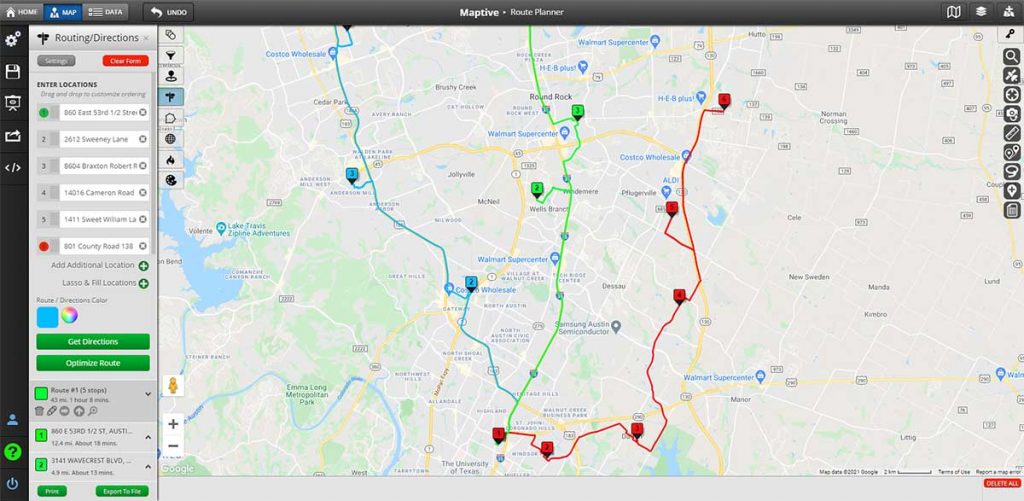
How Mapping Software Can Help Plan Multiple Delivery Routes
Using mapping software to plan the most efficient route for your delivery or service team can help you free up your time and sanity by relieving the stress of constantly checking for traffic updates and calculating distances between clients.
Could you use a Google Maps route planner? that depends on how much time you can have to plan routes, generate driving directions, optimize routes with unlimited stops, and find the best route every time without the help of route planner apps or route planner software.
Maptive is a powerful route-planning software offering various features to help businesses optimize their shipping and logistics routes.
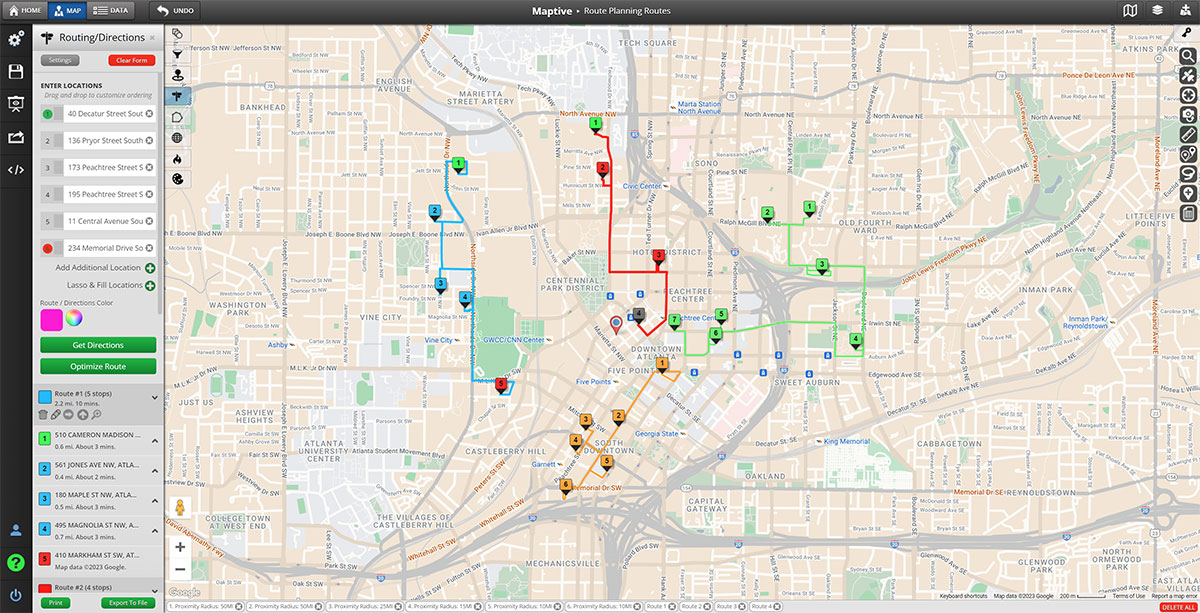
One of its key features is multi-stop route optimization, which considers delivery times, distances, and traffic to create the most efficient delivery schedule.
Maptive also offers real-time traffic updates, which can help drivers avoid delays and get to their destinations faster.
Thanks to its geocoding capabilities and ease of use, Maptive also empowers companies of all sizes to reduce mileage, improve delivery times, and increase delivery capacity–all without requiring any coding or technical knowledge.
The Importance of Mapping Software for Delivery Planning
No matter the size of your business, you will find that adopting a full-featured mapping software like Maptive is the best solution for managing multi-stop routes.
The key reasons include the following:
- Mapping software allows you to visualize your customer locations, warehouses, supply chain depots, or distribution centers. This feature alone can make it easier to identify what is the best, speedy route to take.
- Features like multi-stop route optimization and real-time traffic updates can reduce mileage and improve delivery times.
- By grouping deliveries by location or driver, mapping software can greatly increase your delivery capacity and even reveal inefficiencies in how your staff and vehicles are allocated to each client.
- Mapping software can also generate territories, which you can assign to a specific crew or driver to ensure they cover their assigned areas efficiently.
How to Get Started with Maptive
You can start using Maptive today, here’s how:
- Create an account: you can do this for free and take advantage of Maptive’s free 10-day trial.
- Import data: upload your data into Maptive through spreadsheets, CSV files, or copying and pasting data directly. You can include everything from your client addresses, delivery locations, and any other relevant location data you have.
- Map locations: after importing your data, you can map the locations in Maptive by selecting the relevant data columns and visualizing the locations on the map.
- Optimize routes: select the locations your teams need to visit and the order in which to visit them. This feature helps to reduce driving time and fuel consumption while increasing delivery efficiency.
- Generate routes: now, you can generate routes for your delivery drivers or the entire fleet. Maptive’s real-time traffic updates ensure they’ll avoid congested areas and help you provide accurate delivery times to customers.
Conclusion
In a nutshell, Maptive can be a complete game-changer when it comes to managing multiple routes.
With advanced features like multi-stop route optimization, real-time traffic updates, and geocoding, Maptive offers businesses a wide range of benefits, such as helping lower transportation costs, boosting efficiency, and increasing customer satisfaction.
You can start using Maptive today, and in just a few simple steps, you can experience how it can help take your delivery operations to the next level.
Sign up for a free trial or visit the Maptive website to learn more about this powerful mapping software.