Sales teams lose 11 days per sales cycle without proper territory planning. Harvard Business Review reports that optimizing territory design increases sales by up to 7%, while Alexander Group found productivity gains between 10% and 20%. These numbers tell us something important about the state of modern sales operations.
The problem runs deeper than inefficient routes or unbalanced territories, though those issues matter too. What really costs organizations money is the disconnect between sales resources and market opportunities.
We built Maptive to solve this exact problem. After years of watching sales teams struggle with complex GIS platforms or settle for basic mapping tools, we created a platform that handles unlimited stops, processes up to 70 stops per route, and reduces territory planning time by 75%.
The research backs up what we see every day with our customers. SMA found that organizations achieve 20% higher sales performance with territory planning technology. Salesforce’s State of Sales report shows sales teams report an 18% average staff turnover over the last 12 months, with reps spending only 30% of their time selling during an average week.
Table of Contents
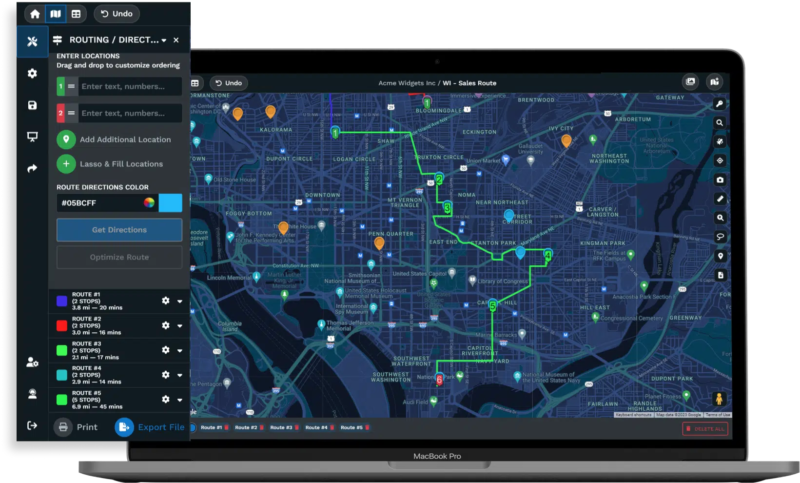
Your field sales team wastes hours planning routes that could be spent closing deals. Maptive’s mapping software eliminates that bottleneck. Businesses using our platform see 20% increases in sales productivity and 15% cost reductions through optimized territories and routes. The upcoming automated territory optimization feature, powered by the latest technology, cuts territory planning time from hours to minutes.
Capacity drives results. Maptive handles up to 70 stops per route, giving your team the ability to schedule 40% more customer visits than competitors limited to 40-50 stops. You create efficient sales routes with 70 stops almost instantly. Upload your location-based data and receive a fully customizable map that reveals territory imbalances, underserved markets, and route inefficiencies your team can act on immediately.
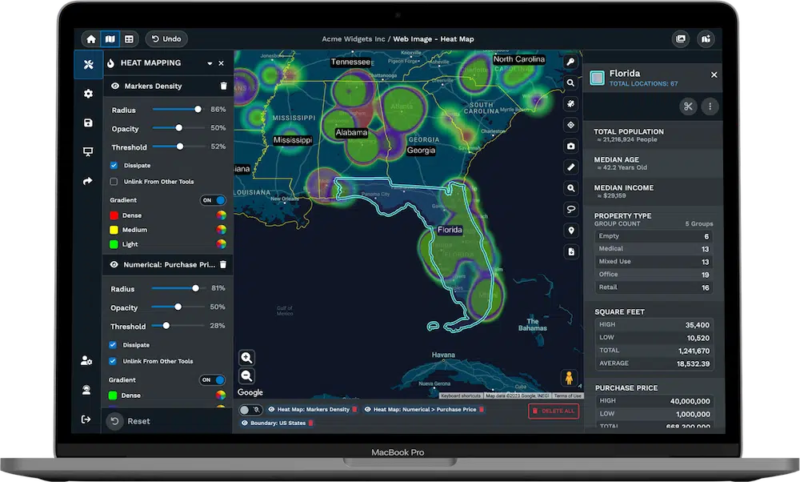
Your sales data deserves enterprise-grade protection. Our 256-bit SSL encryption secures sensitive customer information while role-based access controls let you manage exactly who sees what data. Heat maps show you where revenue concentrates and where opportunities hide. Demographics overlays identify high-value markets your competitors miss.
Integration eliminates double data entry. We connect with Salesforce, HubSpot, Pipedrive, Keap, and Zoho. Direct sync features launching soon mean your sales data flows automatically between systems. Your reps update customer information once and it propagates everywhere.
Time is money. Individual plans start at $1,250 annually per user. Team plans run $2,500 per year. Our 45-day pass costs $250 for organizations that need extended evaluation. Every plan includes a 10-day free trial requiring no credit card, giving you immediate access to test the platform with your actual territory data.
| Feature | Benefit |
|---|---|
| 70 stops per route | Schedule 40% more daily customer visits than industry standard platforms, increasing face-to-face selling time |
| 70 stops processing capability | Plan routes faster with superior capacity that processes complex multi-stop schedules in seconds |
| Automated Territory Creation | Eliminate hours of manual territory planning by generating balanced territories based on rep location, customer data, and drive time |
| OpenGL visualization technology | Analyze large datasets without performance lag, getting immediate insights from complex territory data |
| 256-bit SSL encryption | Meet enterprise security requirements and protect sensitive customer data from unauthorized access |
| Role-based access controls | Prevent data leaks by controlling exactly which team members access sensitive territory and customer information |
| Comprehensive audit logging | Maintain compliance by tracking every territory change with automatic records of who changed what and when |
| Heat maps and demographics | Discover untapped markets and identify high-value coverage areas your team currently misses |
Badger Maps provides routing and mapping capabilities for field sales teams. The platform includes route optimization, CRM integration, and mobile access. Field reps can import customer addresses from spreadsheets or sync contacts from CRM systems.
The route optimization capability handles multiple customer addresses with real-time traffic data. Users can import stops from Excel or CSV files for bulk route planning. The system allows color coding for visual organization of routes. Mobile applications provide offline capabilities for field reps working in areas without consistent internet access.
CRM integration connects with Salesforce, HubSpot, Microsoft Dynamics, and Zoho. The platform includes check-in forms with image capture and location stamping. Automatic weekly reports provide field activity data. Supervisors can set up custom check-in forms with customer details and meeting notes.
| Feature | Details |
|---|---|
| Pricing | Business: $58/month, Enterprise: $95/month |
| Free Trial | 7 days |
| Route Optimization | Multi-stop route planning with traffic data |
| Color Coding | Visual organization for routes and territories |
| CRM Integration | Connects with Salesforce, HubSpot, Dynamics, Zoho |
| Mobile Access | iOS and Android apps with offline capabilities |
| Lead Generation | Google Places integration for prospecting |
| Mileage Tracking | Automated tracking for expense reports |
SPOTIO provides field sales automation for door-to-door sales and field representative management. The platform includes territory management, route optimization, lead generation, and competitor tracking functionalities. The flexible objects feature allows teams to define custom names and fields for objects and arrange them in parent/child hierarchies.
Territory management tools include role-based permission controls and automated assignment areas. The platform provides route planning with on-the-fly updates and one-click communication features. Activity tracking captures visits, calls, texts, and emails automatically with location verification.
Lead management tools include Google Places integration for prospecting and pipeline tracking from first contact through close. The platform supports customizable forms with conditional fields. Gamified leaderboards display performance metrics across teams. Multi-channel communication enables calling, texting, and emailing directly from the application.
SPOTIO integrates with Salesforce, HubSpot, Microsoft Dynamics, Pipedrive, and NetSuite through bidirectional sync. The system includes SSO support with SCIM provisioning scheduled for late 2025. HIPAA compliance features are available for healthcare organizations.
| Feature | Details |
|---|---|
| Pricing | Starting at $39/user monthly |
| Free Trial | Not available, demo provided |
| Custom Objects | Parent/child hierarchy structure for data organization |
| Territory Management | Assignment tools with role-based permissions |
| Lead Generation | Built-in prospecting with Google Places |
| Competitor Tracking | Activity monitoring capabilities |
| CRM Integration | Salesforce, HubSpot, Dynamics supported |
| Mobile Access | iOS and Android applications |
eSpatial provides mapping, territory, and routing solutions for sales, marketing, and operations teams. The platform includes tools to design, adjust, and optimize territories while creating sales and service routes. eSpatial uses AI for scheduling and route optimization.
Territory mapping tools allow users to build territories by ZIP code, account points, or hybrid configurations. The platform supports rapid realignment for business shifts. Weighted balance tools let users refine alignments using custom criteria like customer type ratios or pipeline values. Users can balance territories by revenue, workload, opportunity, or account count while minimizing drive time.
Drive-time polygon features create service area visualizations. The system supports scenario planning with side-by-side territory comparisons. Users can draw custom shapes using polygon and lasso tools. Demographic layers provide income and housing data for market analysis.
Route optimization handles up to 20 routes daily with AI scheduling. The mobile application provides turn-by-turn navigation. Routes can be planned weeks or months in advance for regular account visits. The platform recalculates routes dynamically when schedules change.
eSpatial integrates with Salesforce CRM through native AppExchange installation. The system syncs automatically with CRM data through shared folder configuration. Users set custom update frequencies for data synchronization. The platform exports to CSV, Excel, PDF, PPT, KML, Google Maps, and Tableau.
| Feature | Details |
|---|---|
| Pricing | $1,495 to $9,995 per user annually |
| Starting Price | $1,700 per user annually for base version |
| Route Planning | Up to 20 routes daily with AI scheduling |
| AI Scheduling | Automated route optimization with recalculation |
| Support | Knowledge base, webinars, one-on-one onboarding |
| Web Access | Browser-based platform, no software installation |
| Territory Tools | ZIP code, point-based, and hybrid design |
| Data Analysis | Heat maps, demographic overlays, market insights |
| Mobile Application | iOS and Android with offline capabilities |
Mapline serves as a web-based platform for mapping and data visualization. The software allows users to upload data from Excel or other sources, plot points, and color-code territories. Features include adding boundaries, generating heat maps, and assigning customers to territories automatically.
The platform supports data import from Excel spreadsheets and multiple file formats. Users can plot points by street address, city name, ZIP code, or latitude and longitude coordinates. The system handles geocoding automatically when addresses are uploaded. Color-coded categories provide visual organization for different data types.
Boundary tools allow territory creation by ZIP code, county, or state. The lasso feature lets users draw custom shapes around specific locations. Heat maps display data density and geographic patterns. Automatic territory assignment allocates customers to defined areas.
Chart creation tools provide drag-and-drop functionality for generating reports. The platform offers filters for sorting data by various parameters. Custom map markers can be styled with different colors, sizes, and symbols. Maps can be shared via URL or embedded on websites.
The system includes demographic data layers for market analysis. Users can identify geographic gaps in coverage. Analytics tools help spot trends in customer distribution and sales patterns. The platform supports mobile access through web browsers.
| Feature | Details |
|---|---|
| Pricing | Plans start at $99 monthly for basic, $349 monthly for advanced |
| Free Trial | 7 days available |
| Data Import | Excel, CSV, and multiple file format support |
| Heat Maps | Data density visualization and pattern analysis |
| Territory Assignment | Automatic customer allocation to defined areas |
| Boundary Tools | ZIP code, county, state-based territory creation |
| Ease of Use | No GIS expertise required, browser-based |
| Market Analysis | Risk and opportunity visualization with demographics |
| Map Capacity | Varies by plan, up to 15,000 pins maximum |
Geopointe is a native AppExchange application that integrates with Salesforce. The platform provides territory mapping within the CRM system. Geopointe offers tools for managing territories integrated with Salesforce objects. Features outside basic data visualization are available as add-on upsells.
The system plots Salesforce accounts, contacts, leads, and opportunities directly on maps. Users can create map views from standard Salesforce reports with saved filters. The platform includes shape editor tools for drawing territory boundaries. Automated assignment rules allocate records based on geographic location.
Heat mapping displays geographic density of records. Thematic mapping applies different colors based on field values. Users can customize map markers and apply demographic layers from third-party data sources. The base Google Map style can be personalized to highlight specific features.
Route planning creates optimized paths between multiple Salesforce records. The Route Planner add-on allows advance scheduling for days, weeks, or months. Geo check-in features capture location stamps when reps visit accounts. Live vehicle tracking monitors field team locations in real time.
Territory management includes 10 assignment areas in standard licenses. Additional capacity is available through add-ons. The platform supports mass updates for Salesforce data directly from map views. Integration requires Salesforce expertise for setup and configuration. All data remains within the Salesforce environment.
| Feature | Details |
|---|---|
| Pricing | Starting at $55/user monthly, features are add-on based |
| Free Trial | Available through Salesforce AppExchange |
| Integration | Native Salesforce AppExchange application |
| Territory Tools | Salesforce object integration with shape editor |
| Add-ons | Route Planner, Territory Design, additional assignment areas |
| CRM Requirement | Salesforce license and platform knowledge needed |
| Data Sync | Real-time updates within Salesforce environment |
| Mobile Access | Salesforce mobile app integration |
| Mapping Base | Google Maps with customizable styling |
AlignMix offers territory alignment capabilities for various configurations. The platform supports geographic, account-based, or hybrid territory designs. AlignMix includes account overrides and key account assignments. The platform works across all countries and supports sales territories, districts, and regions.
The TouchAlign technology allows users to adjust territory boundaries by dragging the mouse over areas to expand or contract borders. Territory labels provide instant feedback on changes. The platform includes three hierarchy levels that can be customized to match organizational structure. Users can visualize alignment changes at each level in real time.
AlignMix AI creates, balances, and optimizes territories using advanced algorithms. The Touch Optimize tool enables manual refinement and balancing of individual territories. Users can import complete territory alignments in minutes. The lasso feature carves out new territories directly on the map.
Index tools harmonize various data factors for balanced territory design. The platform supports personnel placement optimization. Batch rename functionality allows simultaneous territory renaming. Thematic heat maps set high and low points in datasets using customizable colors.
Data imports from Excel integrate with the USPS for ZIP code boundary accuracy. The system exports to MyMaps, Tableau, Excel, Google Maps, PDF, and PPT formats. AlignMix provides templates for different territory types. Demographic data includes income and housing information for market analysis.
The software handles territory design for pharmaceutical sales teams and organizations with deep historical territory requirements. Users can create scenario comparisons for realignment planning. The platform processes alignment changes quickly without performance lag.
| Feature | Details |
|---|---|
| Pricing | Starting at $1,700 per user annually for Pro version |
| AI Version | Available with territory creation limits of 50, 150, or unlimited |
| Territory Types | Geographic, account-based, hybrid configurations |
| Global Coverage | All countries supported with localized ZIP code data |
| AI Optimization | Automated territory creation and balancing |
| Demographic Data | Income and housing information layers |
| Touch Optimize | Manual territory refinement and adjustment tools |
| Account Overrides | Key account assignment capabilities |
| Route Planning | Not included in platform |
| Hierarchy Levels | Three tiers: territories, districts, regions |
| Free Trial | Two weeks for evaluation purposes |

Brad Crisp is the CEO at Maptive.com, based in Denver, CO and born in San Francisco, CA. He has extensive experience in Business Mapping, GIS, Data Visualization, Mapping Data Analytics and all forms of software development. His career includes Software Development and Venture Capital dating back to 1998 at businesses like Maptive, GlobalMojo (now Giving Assistant), KPG Ventures, Loopnet, NextCard, and Banking.

 Call Us: