TL;DR
- What is sales territory mapping? Dividing a market into rep-level zones based on revenue potential, workload, and drive time, not land area or ZIP code count
- What should you do before redesigning territories? Audit your current plan by comparing quota attainment across reps, measuring travel hours, and identifying coverage gaps
- How should accounts be scored for territory planning? Rank every account by opportunity value so territories are built on weighted pipeline, not raw account count
- How do you measure whether territories are balanced? Build a workload index that combines account complexity, travel burden, deal cycle length, and pipeline size into a single comparable score per territory
- How many territory scenarios should you test? Three to five alternative configurations, each evaluated against your business objectives for workload and opportunity balance
- What is an acceptable workload variance between territories? No territory should deviate more than 10% from the team average on workload index
- How often should sales territories be reviewed? Quarterly health checks as a baseline, immediate adjustments for rep departures or major account changes, and a full redesign every two to three years
- Why can’t you use spreadsheets and Google Maps for territory design? They lack drive-time analysis, census demographic overlays, heat maps, and side-by-side scenario modeling
- What ROI does territory optimization produce? Harvard Business Review reports up to 7% sales increase. Alexander Group research shows 10 to 20% productivity improvements
What Is Sales Territory Mapping? Definition, Purpose, and How It Works
Sales territory mapping involves dividing a market into zones of responsibility and assigning them to sales reps based on weighted criteria. Geography is one factor, alongside account potential, workload demands, demographic data, and competitive positioning. The map is only the output. The underlying approach involves resource allocation and customer segmentation, and the map provides a visual representation of those decisions.
The objective is to ensure every prospect is covered, each rep has a practical path to quota, and revenue is not lost in gaps between territories. Achieving this outcome involves more than drawing lines on a map. It calls for a methodology that addresses the complexity of the market, the sales team, and the available data. This guide addresses the entire process, from initial audit through ongoing management, rather than focusing solely on the planning stage.
5 Sales Territory Mapping Myths That Hurt Performance
- Myth 1: Territory mapping is solely a geographic exercise. Geography shows where accounts are located, but does not reveal account potential, workload requirements, or competitive density. A plan based only on geography may create territories that appear similar in size but produce very different results in practice. Effective territory designs combine multiple data points, with geography often taking a secondary role.
- Myth 2: Annual territory planning is sufficient. Markets change, sales reps transition, and new products are introduced. Customer bases may contract or expand. A plan set at year-end may lose effectiveness within a few months. Organizations relying solely on annual reviews often respond to issues that have built up over time. Quarterly reviews, along with immediate adjustments for key events such as rep departures or major account changes, are typical for teams seeking better territory management.
- Myth 3: Equal geography means balanced territories. A rep covering 50 accounts across three states and a rep covering 50 accounts in a single metro area do not have equivalent territories. Travel time alone makes one workload dramatically heavier than the other, even though the account count is identical. Balance means equitable distribution of opportunity and workload, and that often produces territories of very different physical sizes.
- Myth 4: Spreadsheets and Google Maps are sufficient. These tools cannot visualize territory overlap, calculate drive times between all account pairs, add demographic data to boundaries, or run scenario models for comparing multiple configurations. For a small team with accounts in one city, these tools may be adequate. For larger teams or more complex setups, their limitations can result in missed revenue opportunities that are difficult to detect.
- Myth 5: Territory realignment always disrupts the team. Disruption occurs when realignment is poorly handled. When sales reps have access to the data, understand the rationale, and see that the new plan creates a fairer workload and a practical chance at meeting quota, the response is often positive. According to the Sales Management Association, 58% of organizations rate their territory mapping as ineffective. Sales reps in those organizations are aware of the issues with their territories and expect improvement.
Research from the Alexander Group indicates that optimized territories can result in a 10 to 20% increase in productivity. A well-communicated realignment may cause a temporary disruption, but leaving ineffective territories unchanged leads to ongoing challenges.
Why Sales Territory Mapping Matters: ROI, Revenue Impact, and the Cost of Inaction

The Hidden Cost of Poor Sales Territory Design
Revenue losses from poor territory design often go unnoticed in financial reports. These losses occur in various forms: missed opportunities in certain markets, sales representatives assigned more accounts than manageable, and high-potential areas left unaddressed due to unbalanced assignments.
Coverage gaps are a common issue. For example, if 20% of your addressable market is not assigned due to boundaries set around current accounts instead of potential, and your average deal size is $50,000, the quarterly loss becomes apparent. Another factor is inefficient travel: sales representatives may spend excessive time traveling between accounts that could have been grouped more effectively, reducing time available for actual sales activities.
Rep turnover represents a costly problem. Sales representatives assigned unattainable quotas often leave. Replacing a sales rep typically costs between 1.5 and 2 times their annual compensation, considering recruiting, onboarding, ramp time, and lost sales opportunities during the vacancy. When turnover is concentrated in specific territories, territory design likely plays a role.
Industry research indicates that organizations with effective territory design achieve higher sales performance, with some studies reporting improvements of up to 30%. The Sales Management Association found a correlation between effective territory design and a 14% increase in achieving sales objectives. These figures illustrate the difference between organizations that apply territory methodology and those that do not.
How Optimized Sales Territories Increase Revenue and Productivity
Optimized territories can drive improvement in several areas. Alexander Group research reports productivity gains of 10 to 20%. Harvard Business Review cites a potential revenue increase from territory optimization of up to 7%. Some Maptive users have reported 20% productivity improvements and quarterly savings exceeding $100,000.
Reducing travel time allows sales representatives to dedicate more hours to selling. Increased selling time can generate more potential deals. If conversion rates remain consistent, this leads to higher quota attainment, increased commission earnings, and reduced turnover. With lower turnover, new hires become fully productive more quickly, increasing the number of productive representatives at any given time.
Each of these effects is modest on its own, but collectively across a team of 15, 30, or 100 representatives, the revenue impact can be considerable. Territory optimization serves as a revenue function managed within operations.
How to Calculate the ROI of Sales Territory Mapping
You can build a rough ROI model with data you already have. Start with 4 inputs: current average travel time per rep per week, average selling hours per rep per week, team quota attainment rate, and annual rep turnover rate.
Industry research indicates that sales representatives spend approximately 28% of their time on sales activities. If territory optimization increases this to 33% by reducing travel and eliminating overlap, the result is an increase in total selling capacity.
For a 20-person team, if the average annual quota is $1 million per representative and current attainment is 70%, total team production is $14 million. A 7% increase from territory optimization, as reported by Harvard Business Review, raises production to $14.98 million. This results in approximately $1 million in additional revenue. After accounting for the cost of mapping software and time spent redesigning territories, the return remains positive.
For the travel component, multiply the average hours per week each rep spends driving by the number of reps, then multiply the result by their fully loaded hourly cost. Even a 15% reduction in drive time across the team generates measurable savings.
Maptive offers a free trial that lets teams upload their own account data, map their current territories, and measure existing travel time and coverage gaps firsthand. That baseline measurement is the foundation for any credible ROI calculation, because you’re using your own numbers, not industry averages.
What Data Do You Need for Sales Territory Mapping?
CRM Data: Sales Performance, Win Rates, and Account Locations
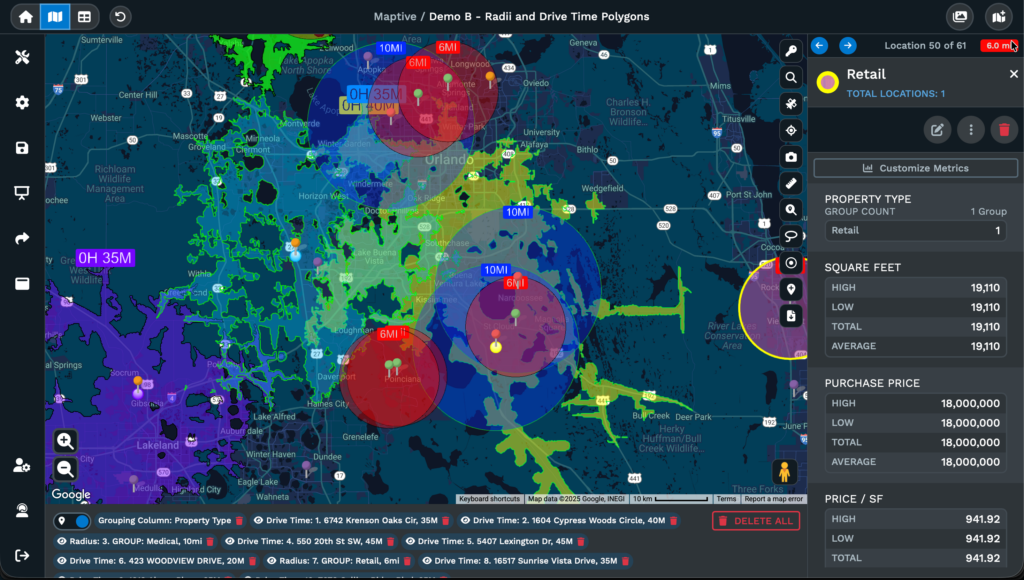
Pull the following from your CRM before you start any territory design work: account addresses, deal sizes (closed and pipeline), win rates by region, pipeline stage distribution, historical revenue by territory, customer lifetime value, and activity data, including calls, meetings, and emails per account.
Account locations indicate areas of business concentration. Win rates by region highlight team performance strengths and weaknesses. Activity data shows the effort required in each territory based on real interactions. Pipeline-stage distribution by territory identifies where deals stall, which may suggest issues related to the territory rather than individual representatives.
A warning on CRM data quality: industry studies consistently find that CRM data degrades at roughly 30% per year without active maintenance. Addresses change. Contacts leave. Companies merge, relocate, or close. Running a territory redesign on dirty data produces territories that look good in the model but fail in the field. Audit your CRM data before you start. Deduplicate accounts, verify addresses, mark dormant accounts, and update contact information. The quality of your territory plan is capped by the quality of your data.
Market Data: Total Addressable Market, Prospect Density, and Competitors
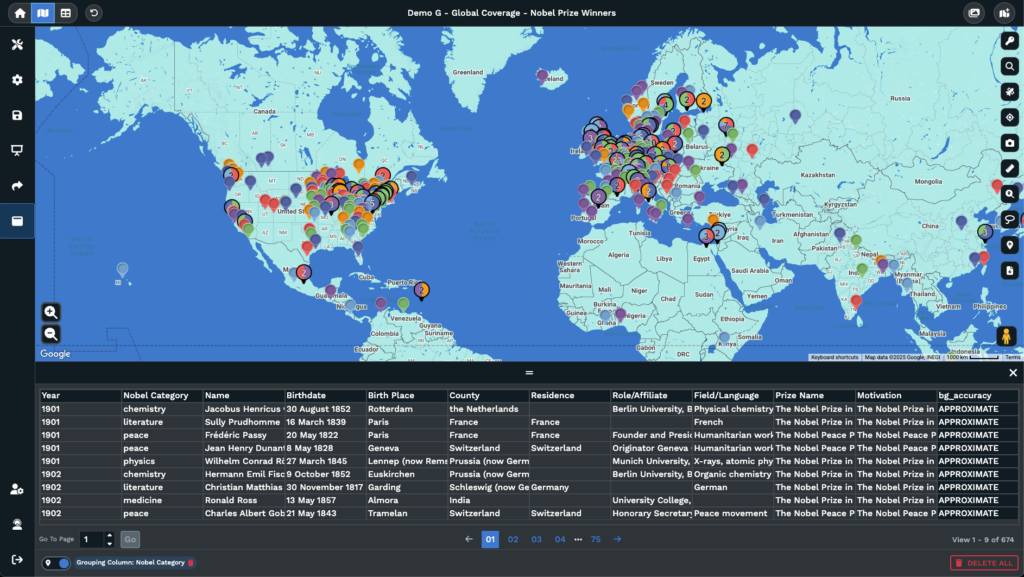
CRM data shows past sales locations, while market data points to potential sales areas. This distinction is important because territory plans based solely on existing customer locations can overlook potential opportunities.
You need total addressable market estimates by region, prospect density data, industry concentration patterns, competitor locations and approximate market share, and economic indicators by geography. Government economic data, industry association reports, and third-party data providers such as Dun & Bradstreet, ZoomInfo, and LinkedIn Sales Navigator can fill these gaps.
Layering market potential with current sales performance can reveal gaps between existing revenue and available opportunities. Territories showing strong current revenue might not be capturing all available opportunities, while those with lower revenue could contain prospects that have not yet been pursued. Comparing these metrics provides insight into where additional sales efforts could be focused.
Demographic Data: How Census and Population Data Improve Territory Design
This is where most territory planning guides stop short. They mention demographics in passing without explaining how to apply them to actual territory decisions.
Demographic data offers information that account-level and market data do not provide. Median household income gives insight into buying power for products or services influenced by income. Population density affects the number of prospects a representative can contact in a given timeframe. Age distribution is relevant for products with demographic targeting. Education levels often align with certain B2B buyer profiles. Employment data details business density and workforce composition.
For example, a home services company designing territories should consider homeownership rates and median home values, rather than ZIP code count alone. A territory with 30 ZIP codes in an urban area with low homeownership may have fewer qualified prospects than a territory with 10 ZIP codes in a suburban area where a higher percentage of residents own their homes. Demographic data helps align territories with actual prospect potential.
Census data is freely available from the U.S. Census Bureau and can be mapped to enhance territory planning. Maptive’s demographics and census mapping tool overlays income distribution, population density, age, education, and employment data onto a territory map. This enables users to set boundaries based on these factors without purchasing additional data sets or performing manual imports.
Geospatial Data: Drive Times, Distance Matrices, and Route Efficiency
For example, a representative with accounts located within a 15-minute radius will have a different workload than one with accounts spread across a 90-minute driving area, even if both have similar account numbers or revenue.
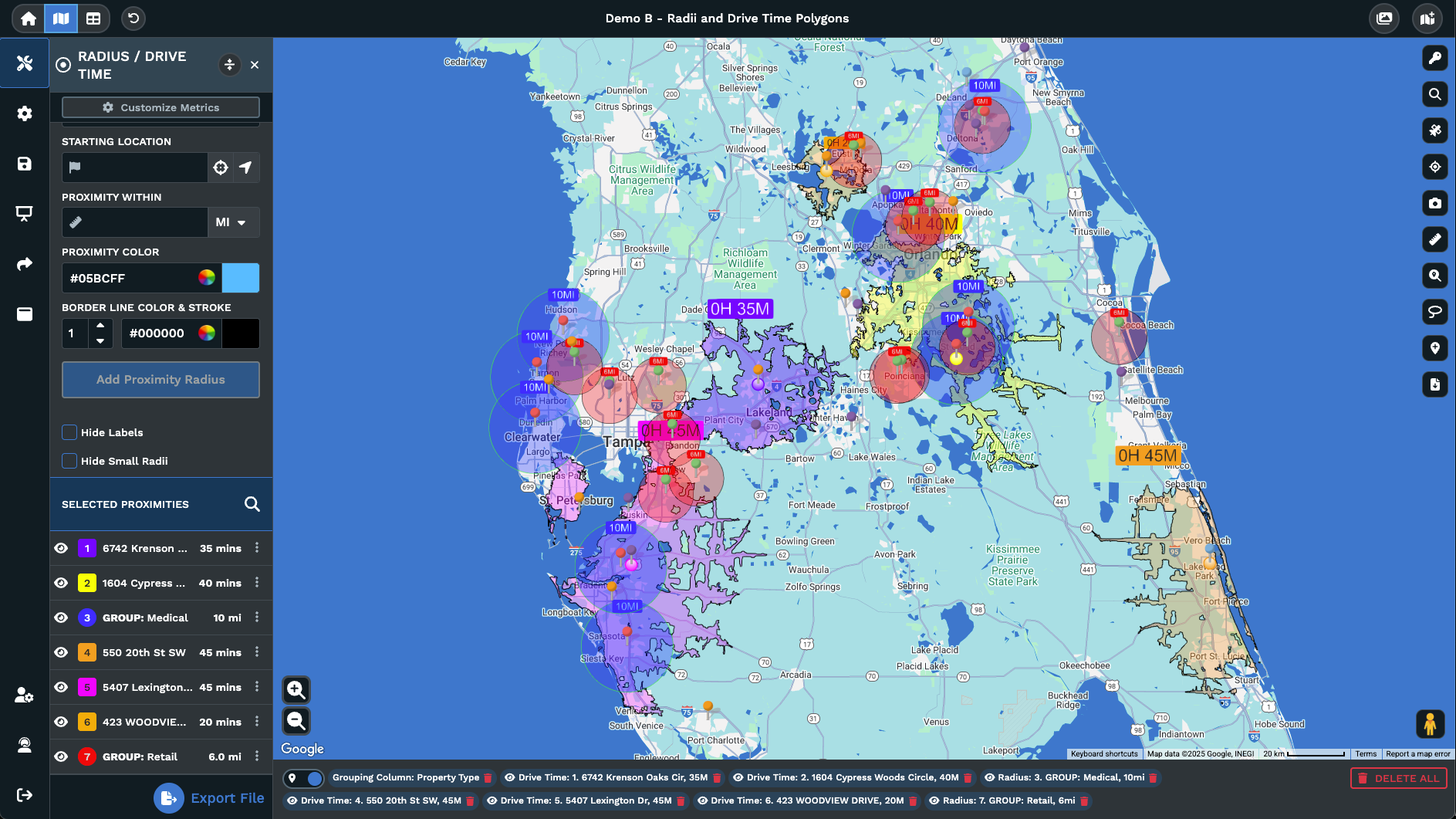
Drive-time polygons calculate the area that can be reached within a specific time frame from any point, using actual road networks rather than straight-line distance. These are more useful than radius circles because they consider highways, terrain, traffic patterns, and road connectivity. Maptive’s drive-time polygon tool performs these calculations directly on the map.
Distance matrices calculate travel time between each pair of locations in a dataset. This process shows which accounts are efficiently grouped and which are outliers that reduce a representative’s productivity. Maptive’s distance matrix calculator performs this analysis across an entire account list.
Industry research indicates that field sales representatives spend approximately 28% of their time on selling activities. Poor territory design contributes to this outcome. Excessive drive time, resulting from geographically dispersed accounts in a single territory, reduces the hours available for selling.
How to Create a Sales Territory Plan in 6 Steps
Step 1: Set Business Objectives That Drive Territory Design
Before using a mapping tool or spreadsheet, define the business objectives that inform every territory decision. Skipping this step often leads to territories that appear evenly distributed but do not match the organization’s strategy.
For example, entering new markets, maintaining share in current ones, introducing a new product line, or increasing sales to established customers each calls for a distinct approach to territory design. Each objective assigns greater or lesser importance to specific variables.
When pursuing new market penetration, territories should emphasize prospect density and total addressable market, sometimes prioritizing these over existing customer concentration. For account retention and expansion, factors such as current customer count, renewal timing, and upsell opportunities should take precedence. Launching a specialized product may require separate territories or segmentation by product line.
Translate business goals into specific criteria for each territory and document them. For example: “We are designing territories to increase new customer acquisition in the mid-market segment, with a secondary goal of retaining current enterprise accounts.” This type of statement informs how you score accounts, set boundaries, and assign representatives. Without these criteria, territory design often becomes an exercise in balancing numbers rather than achieving intended outcomes.
Step 2: Audit Your Current Sales Territories for Imbalance
Many guides move directly to building new territories and omit the audit step. However, diagnosing current issues and providing data-driven reasons for changes helps ensure alignment within your sales team.
Start by comparing quota attainment across territories. A wide range, such as some representatives consistently at 120% and others below 70% regardless of tenure or skill, may indicate a structural issue rather than a personnel issue. Measure the standard deviation of attainment. A well-constructed territory structure produces a narrower distribution, while a poorly constructed one results in more outliers.
Next, review travel time by territory. If one representative spends 30% or more of the week traveling while another typically works within a single metro area, the workload is distributed unevenly. Compare the number of accounts per representative against the revenue per representative. For instance, a representative with 80 accounts generating $500,000 and another with 40 accounts generating $800,000 are working under different conditions. Also, review pipeline coverage ratios by territory. If some territories have three times the pipeline against quota and others only 1.5 times, opportunity is not distributed evenly.
Look for these signs: territories that resulted from years of staff changes without strategic planning; representatives who have accumulated accounts over time rather than through planned assignments; customer complaints about slow response times in particular regions; or consistent underperformance by new hires in territories where previous representatives also had difficulties.
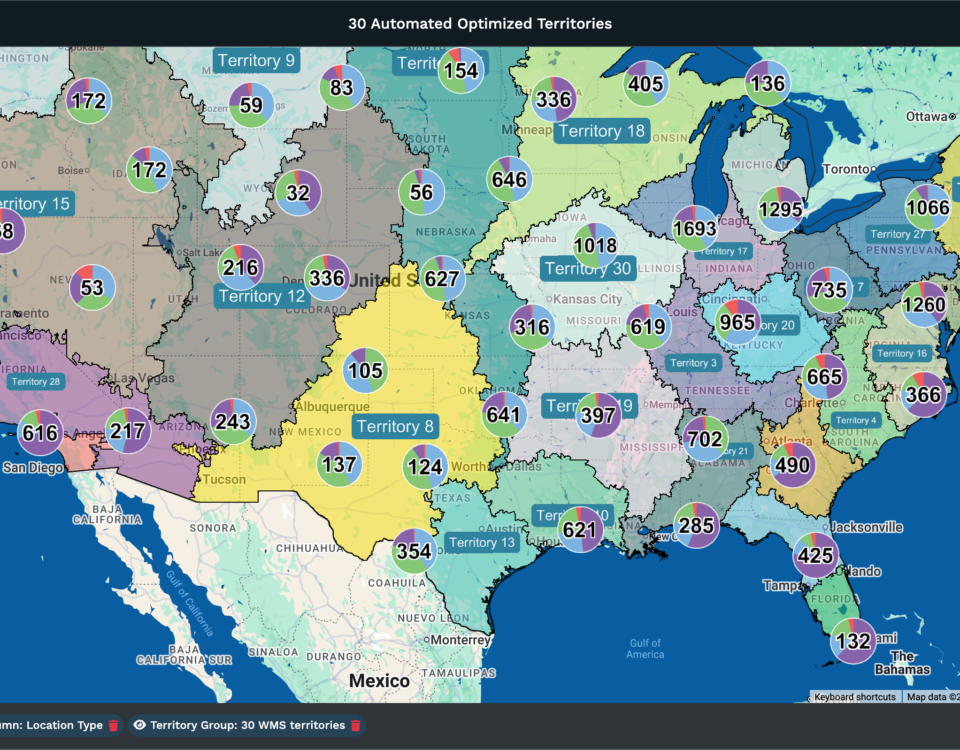
Uploading your current account data into Maptive and generating a heat map provides a quick way to make these imbalances visible. Viewing account clusters and gaps on a map reveals patterns that are harder to detect in spreadsheets. This visual information also supports building organizational alignment for a territory redesign.
Step 3: Choose a Sales Territory Segmentation Model
The segmentation model determines how you divide your market. There are six primary models, and most mature organizations use a hybrid of two or three of them.
Geographic territories divide the market by physical boundaries, such as states, counties, ZIP codes, or custom polygons. They work best for field sales teams that require in-person visits, products that need physical demonstration, and service businesses where response time is critical. The advantage is simplicity and travel efficiency. The tradeoff is that geographic models ignore account quality entirely. A territory with equal land area may have vastly different levels of opportunity depending on the region’s economic profile.
Industry-based territories assign reps to vertical markets such as healthcare, manufacturing, financial services, and technology. They work best when sector expertise drives win rates and when buyers expect their rep to understand their industry’s specific challenges. The tradeoff is geographic inefficiency. A rep covering all healthcare accounts nationwide will spend more time traveling than a rep covering all industries in a single state.
Account-based territories assign specific named accounts to reps, typically for strategic or enterprise accounts with long sales cycles and high deal values. The tradeoff is workload unpredictability. One global enterprise account may consume as much rep capacity as 20 mid-market accounts.
Product-based territories assign reps by product line when different products require specialized knowledge. The tradeoff is customer confusion if multiple reps from the same company call on the same account for different products.
Channel-based territories separate direct sales from partner and distributor channels. The tradeoff is potential conflict when direct and indirect channels compete for the same accounts.
Hybrid models combine two or three of these approaches. A common configuration is geographic territories for field sales with industry overlay territories for specialist support. Hybrid models require better data and more sophisticated tools, but they produce the most accurate match between territory design and go-to-market reality.
When Geographic Sales Territories Work Best
Geographic models are the right choice when your sales motion requires frequent in-person visits, your product benefits from physical demonstration, or your service model depends on response time. Field sales teams in industries such as medical devices, industrial supply, food and beverage distribution, and commercial real estate typically rely on geographic territories because travel costs directly affect how many accounts a rep can cover. Even within a geographic model, though, territories should be weighted by account potential within each geography, not drawn by equal land area or ZIP code count.
When to Use Industry, Account-Based, or Hybrid Territory Models
If your win-rate data shows that industry expertise is the primary differentiator between successful and unsuccessful deals, then industry segmentation is the better fit. If your average deal size is large enough that individual accounts justify dedicated resources, named account territories make sense. If your organization sells through both direct and indirect channels, you’ll need at least some channel-based segmentation layered on top of your chosen primary model. And even in territory models that aren’t organized by geography, reps still benefit from knowing where accounts are physically located for travel planning, event coordination, and local market awareness.
Step 4: Segment Your Market and Score Accounts by Revenue Potential
Raw account lists are unusable for territory design. You need to score every account so that territories can be built around weighted opportunity rather than raw count.
Build a scoring model on a 1 to 5 scale using these inputs: deal size potential based on company size and industry, buying signals from engagement data or intent platforms, competitive presence (are you up against an incumbent?), strategic fit with your ideal customer profile, and readiness to buy based on pipeline stage or behavioral indicators.
Scoring prevents the most common territory design mistake: treating all accounts as equal. The Pareto principle applies aggressively here. Roughly 20% of your accounts will generate 80% of your revenue. If those high-value accounts are clustered in two territories while the remaining territories are packed with low-potential accounts, quota attainment will be lopsided no matter how balanced the account counts look.
Scored accounts become the building blocks of territory design. You’re not assigning regions. You’re distributing scored opportunity units. When you add your score as a column in your spreadsheet and upload it to Maptive, you can use the filter and color-by-group tools to visualize scored accounts on the map. High-value clusters and gaps become immediately visible, and you can draw territory boundaries around balanced opportunity rather than balanced geography.
Step 5: Map Territory Boundaries and Run What-If Scenarios
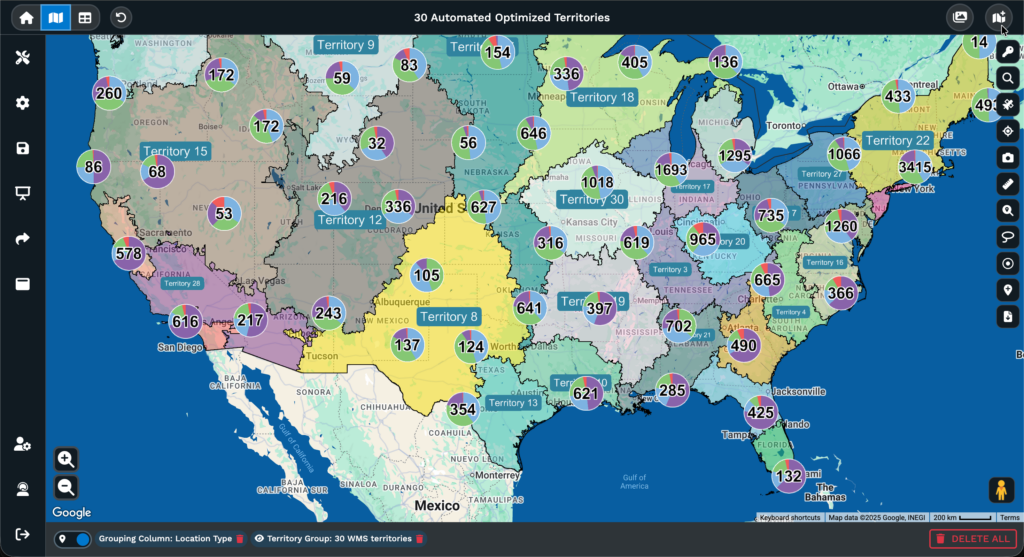
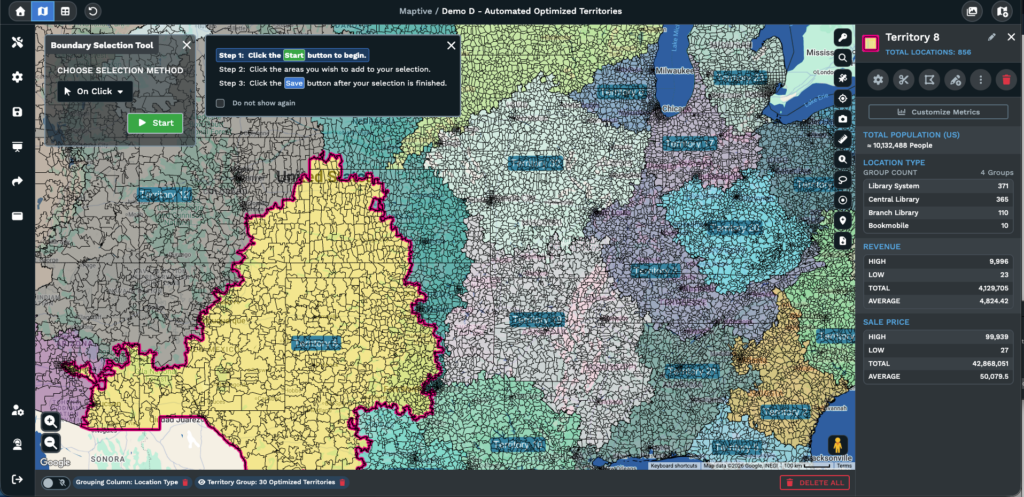
This is where the plan takes physical form. Upload your scored account data and market data into Maptive, and the platform geocodes your addresses and plots them on the map. From there, you can use Maptive’s polygon territory tool to draw custom boundaries or the geographic boundary tool to build territories from pre-existing boundaries like state lines, county borders, or ZIP codes.
Maptive’s automated territory creation can generate initial balanced configurations, which you can then refine manually. This saves significant time compared to starting from scratch, especially for teams with hundreds or thousands of accounts.
The real value is in scenario modeling. Instead of committing to the first configuration that looks reasonable, build 3 to 5 alternative territory maps and evaluate each one against your business objectives from Step 1. For each scenario, check whether the workload per rep is within 10% of the team average. What is the average drive time between accounts within each territory? Is revenue potential distributed equitably, or do some territories carry disproportionate opportunity? Are there geographic gaps with unassigned prospects?
Industry data suggests that roughly 20% of territory realignment projects fail, frequently because teams are committed to the first configuration they built without testing alternatives. Scenario modeling eliminates that risk. You’re comparing options with data, not guessing and hoping.
Step 6: Validate the Territory Plan with Your Sales Team
Do not skip this step. Reps have ground-level intelligence that no data set captures. They know which accounts have strong personal relationships that shouldn’t transfer. They know which regions have seasonal access issues, like snowbird territories that go quiet in summer or resort markets that are inaccessible during winter. They know where a competitor has an entrenched position that the market data doesn’t fully reflect.
Beyond information, this step is about buy-in. A territory plan imposed from above generates resistance, even when it’s objectively better. A plan that includes rep input generates ownership. Reps who helped shape the plan will defend it rather than undermine it.
Here’s a practical approach: present the proposed map to the full team, collect structured feedback using a template that asks specific questions (”Which accounts in your proposed territory do you lack relationships with?” “Which accounts in neighboring territories do you currently serve?”), Run one final scenario adjustment based on that feedback, and then lock the plan.
Maptive’s share, print, and embed features make this step operationally simple. Send interactive map links to reps so they can explore the proposed plan without needing a full platform license. That transparency converts skeptics faster than any presentation.
How to Balance Sales Territories: Workload, Revenue, and Opportunity
What Does a Balanced Sales Territory Look Like?
Balanced does not mean equal. Instead, it refers to distributing opportunities and workload so each rep can reasonably aim to meet their quota.
For example, two territories each have 50 accounts. Territory A has accounts across three states with an average drive time of 45 minutes between appointments. Territory B’s accounts are within one metropolitan area, with an average drive time of 12 minutes. The rep for Territory A spends about three times more time traveling each week, reducing available selling hours. The account count matches, but the workload differs.
A further comparison shows that Territory A’s 50 accounts include 10 enterprise accounts averaging $200,000 per deal, while Territory B’s are all mid-market at $40,000 per deal. Revenue potential totals $2.8 million for Territory A compared to $2 million for Territory B. Although the account count is the same, the workload is lighter in Territory B, and revenue potential is greater in Territory A. Assigning the same quota to both would create an imbalance and likely result in missed targets for the rep in Territory B.
Balancing requires a composite metric that accounts for all of these factors simultaneously. That composite metric is the workload index.
How to Build a Sales Territory Workload Index
A workload index combines several territory variables into a single score, enabling objective comparisons between territories.
Inputs to include: number of accounts, account complexity (enterprise accounts require more touchpoints and longer sales cycles than mid-market accounts), revenue potential (total scored opportunity), average drive time between accounts, deal cycle length, and service frequency requirements (weekly visits versus quarterly check-ins).
Weight each input according to the sales process. For field sales, where travel is the primary constraint, drive time should account for 25 to 30% of the total weight. For inside sales, drive time is minimal, and account complexity becomes the largest factor. The formula varies by organization.
For example, Territory A includes 30 enterprise accounts requiring quarterly in-person visits across two states and an average deal cycle of nine months. Territory B includes 80 small-business accounts that need monthly phone check-ins within a single metro area, with an average deal cycle of 30 days. The higher account count in Territory B appears more demanding. However, once factors such as account complexity, travel time, and deal-cycle management are properly weighted, the workload index indicates that the territories are similar in demand.
A plus-or-minus 10% rule helps maintain balance: no territory should deviate more than 10%from the team’s average workload index. If a territory falls outside this range, adjust boundaries and redistribute accounts accordingly.
Maptive’s grouping and filtering tools provide visualizations of workload distribution by color-coding territories based on workload scores. These visual tools allow for quick identification of imbalances and facilitate prompt adjustments.
How to Distribute Revenue Potential Evenly Across Territories
Workload balance and revenue balance require separate solutions. Addressing one does not, by default, resolve the other.
A territory can have a perfectly manageable workload and poor revenue potential if it’s loaded with accounts that scored low on your opportunity model. The rep won’t be overworked, but they’ll miss quota because the territory can’t produce enough pipeline.
To check the revenue balance, calculate the total scored opportunity per territory. Compare that number against the assigned quota. Every territory should contain enough addressable opportunity to support quota attainment at a realistic win rate. If a territory’s total scored opportunity is $2 million, the assigned quota is $1.5 million, and the historical win rate for that segment is 30%, the territory mathematically cannot support the quota. The rep would need to close 75% of their total pipeline, which is unrealistic in most sales environments.
Many organizations encounter misalignment because quota planning and territory planning occur in separate departments and often do not converge until late in the process. Linking territory potential analysis directly to quota setting helps address this issue.
In Maptive, scored opportunity data can be layered onto the territory map. The filter tool sums revenue potential for each territory, supporting visual comparison and identification of territories that are over- or under-resourced.
Using Heat Maps and Drive-Time Polygons to Validate Territory Balance
Heat maps and drive-time polygons serve as a quality check for territory design. Initial boundaries are set first, followed by validation through these tools.
Generate a heat map of revenue potential using Maptive’s heat mapping tool. Areas with high concentrations of opportunity are identified as hot spots, while areas with fewer opportunities are cold spots. When a hot spot appears near a territory boundary, assess whether a nearby rep can serve those accounts more efficiently. Adjust boundaries where necessary to align account clusters with efficient assignment.
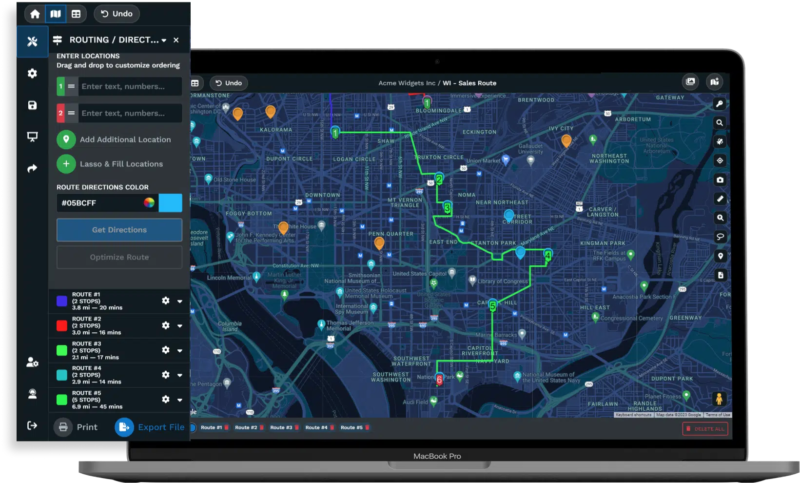
Overlay drive-time polygons using Maptive’s drive-time polygon tool. Set the polygon to the maximum allowable drive time per visit, such as 60 or 90 minutes, based on market needs. Generate the polygon from each rep’s home base or office. Accounts outside the polygon are considered unreachable during a standard workday, even if technically within the territory boundary.
Use Maptive’s radius map tool to check for overlap between adjacent territories. Overlap occurs when multiple reps are assigned to the same account in the same area, leading to confusion and inefficiency. Gaps indicate that accounts in an area lack assigned coverage.
The process of adjusting boundaries, reviewing heat maps, verifying drive times, and checking for overlap transforms territory design into an optimization task. Each adjustment brings the plan in line with the initial objectives you set in Step 1.
How to Assign Sales Reps to Territories
Key Factors for Sales Territory Assignment: Experience, Expertise, and Fit
With territories defined, the next step is assigning the appropriate sales representatives to each one.
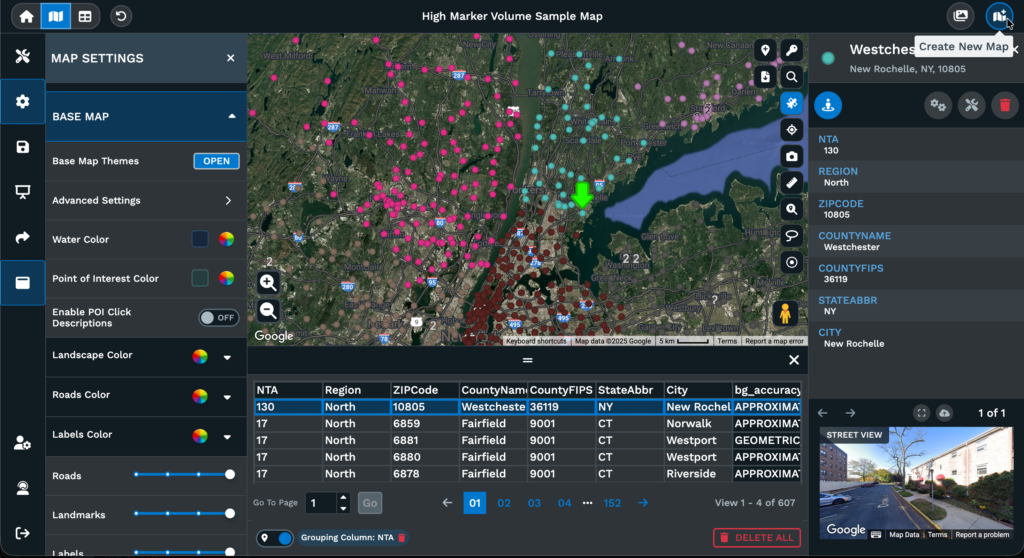
Key considerations include sales representative background, industry knowledge, familiarity with the product, existing customer contacts within the territory, employment status (new hire or experienced), track record, and location relative to the territory.
These factors should be considered alongside the attributes of each territory. For example, territories with many enterprise accounts and complicated sales processes require representatives skilled in handling extended deal timelines and coordinating with various stakeholders.
Territories focused on acquiring new business benefit from salespeople who are effective at prospecting and building client pipelines. Territories where the main opportunity lies in maintaining or growing existing accounts require representatives who are effective at account management.
There are two frequent assignment errors. One involves allocating the most attractive territories to high performers as a form of recognition, which can lead to an uneven distribution of opportunity. This creates a situation where some representatives exceed targets while others fall short, largely due to territory characteristics rather than skill disparities.
Another error is assigning territories based solely on proximity to the representative’s location, without evaluating if their skills and experience align with the territory’s requirements.
How to Align Sales Territories with Quotas and Compensation Plans
Territory design, quota setting, and compensation planning are three functions that must be coordinated. When they’re handled independently, which is common, the result is quotas that territories can’t support and comp plans that incentivize behavior the territory structure can’t accommodate.
The alignment process follows a logical sequence: territory opportunity sets the quota, which then informs the compensation structure. For example, with a territory representing $3 million in opportunity and a historical win rate of 25%, a quota of $750,000 is reasonable. Setting a higher quota based solely on company goals, rather than territory analysis, will likely result in missed targets and a lack of buy-in from sales representatives.
When quotas are not set in accordance with territory analysis, several issues can arise. Representatives assigned unattainable quotas may focus only on easier opportunities or consider other roles. Representatives with quotas set too low may not strive for higher performance, which can influence overall team performance. These outcomes can be avoided by directly connecting territory analysis to the quota-setting process.
Compensation planning remains important during any reorganization. When accounts move between territories, the associated commission opportunities also transfer. Sales representatives benefit from clear communication regarding how changes might affect their earnings. Compensation plans should include provisions such as minimum guarantees, protections, or transitional payments to address concerns about income changes.
Change Management: How to Communicate Territory Realignment to Your Sales Team
A frequent cause of resistance during territory realignment is concern about potential income loss. That concern is rational and should be addressed directly rather than dismissed.
A communication framework that works begins with the data behind the redesign. Heat maps, workload comparisons, and quota-to-opportunity ratios are more persuasive than claims that the new plan is “better.”
Next, explain what each rep gains, not only what changes. A statement such as “We’re removing 10 low-value accounts that require four hours of weekly driving and replacing them with five high-value accounts within 20 minutes of your home base” shifts the discussion from loss to efficiency.
Provide a structured feedback window before finalizing the plan. The redesign remains the direction moving forward, yet the feedback period allows reps to raise concerns and review the proposed territories.
Document the reasoning behind each change and make it accessible. When a rep asks, “Why did I lose Account X?” the answer should already be in writing and supported by data.
Maptive’s sharing features help support this process. Territory maps can be exported for leadership presentations, shared as interactive links for reps to review, or embedded in internal communications. When people see the data displayed on a map rather than in a spreadsheet, the conversation shifts from “You’re taking my accounts” to “I can see the reasoning.”
How Maptive Makes Sales Territory Mapping Faster and More Accurate
Why Spreadsheets and Google Maps Fall Short for Territory Mapping
If your territory planning currently happens in Excel and Google Maps, these tools do not provide the capabilities necessary for effective territory design.
Spreadsheets can sort, filter, and calculate. They do not support drawing territory boundaries, identifying overlapping territories, or calculating drive time between all account pairs. Adding census data to account lists, modeling alternative configurations concurrently, and generating revenue density heat maps are not available functions.
Google Maps can plot account locations and provide driving directions. It can’t create territory boundaries, balance workloads, generate heat maps, sync with your CRM, or run scenario models that compare territory configurations.
These limitations prevent territory design from achieving business objectives. The sales mapping software market is valued at $2.5 billion because organizations found that general-purpose tools do not meet the requirements of territory management.
Dedicated mapping software is required to implement the methodology described in this guide. Building a workload index, validating balance with heat maps, modeling multiple scenarios, and overlaying demographic data cannot be accomplished with spreadsheets and Google Maps. These capabilities are not available in those tools.
How Maptive Supports Every Stage of the Territory Planning Process
Each step in the 6-step framework maps to a specific Maptive capability.
For data import (the foundation of every step), upload Excel, CSV, or Google Sheets data, and Maptive geocodes up to 100,000 locations automatically. Up to 70,000 monthly geocodes are included, so ongoing data refreshes don’t require manual reprocessing.
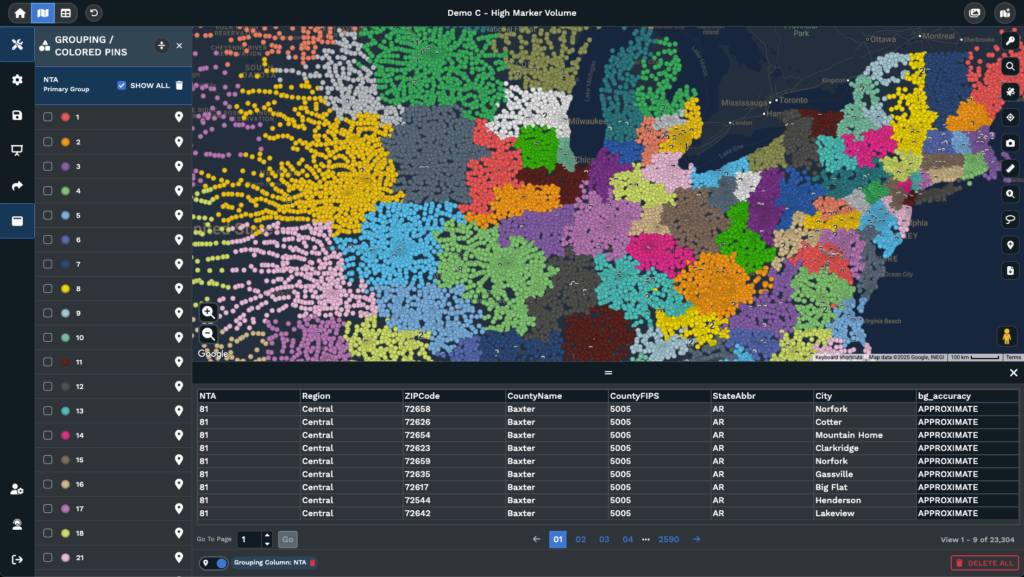
For territory design (Steps 3 and 5), the polygon tool enables drawing custom boundaries, while the geographic boundary tool builds territories using predefined boundaries, such as states, counties, and ZIP codes. For teams seeking an initial configuration, Maptive’s automated territory creation generates balanced configurations and includes bulk editing capabilities.
For demographic analysis (Step 4 and the data section), overlay census data such as age, income, education, and employment directly on the territory map. No separate data purchase or manual import is required. The demographic layer appears with account data and territory boundaries, which allows territory decisions to incorporate market potential within a single platform.
For travel analysis (Steps 2 and 5 validation), drive-time polygons calculate reachable areas from a given point using road network data. The distance matrix calculator computes travel times between all locations in the dataset. These tools provide measurable data to assess territory balance.
For performance visualization (Steps 2 and 5), heat maps show density patterns, coverage gaps, and revenue concentration. Color-coded territories enable comparison of workload, opportunity, and performance across the team in one view.
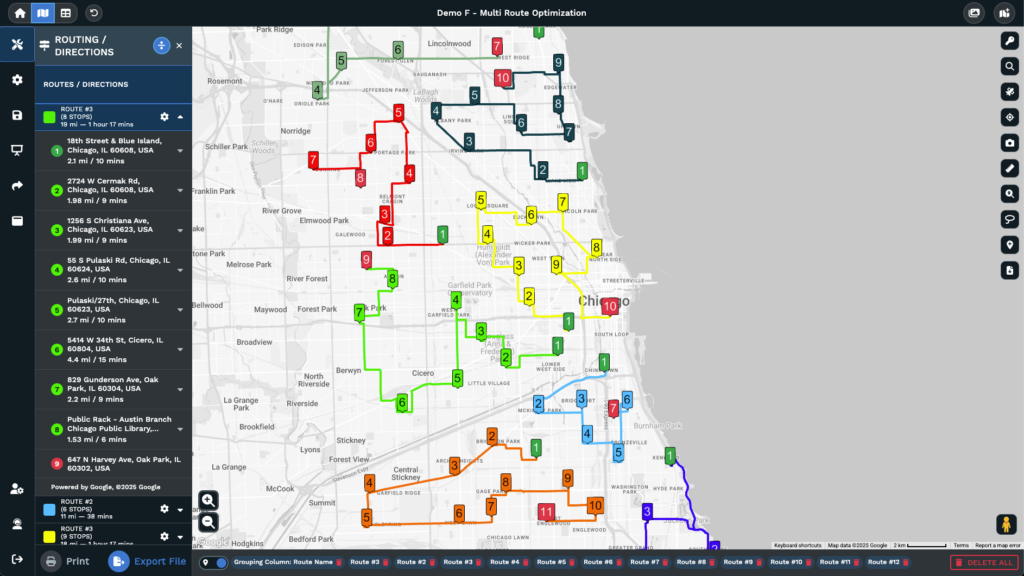
For daily operations, the multi-stop route planner calculates the fastest path through up to 73 stops using road networks, supporting territory execution for field representatives.
For collaboration (Step 6), export maps for presentations, send protected interactive links to stakeholders, or embed map views in internal tools. CRM synchronization via API keeps the territory map current as pipeline data changes, ensuring access to updated information.
Maptive users report territory planning that is 75% faster, 29% reduction in overloaded territories, 20% increase in productivity, and quarterly savings exceeding $100,000. These outcomes are supported by having necessary capabilities within a single platform instead of using multiple tools.
Getting Started with Maptive: From Data Upload to Territory Map
The onboarding process is efficient. Sign up for the free trial (no credit card required). Upload a spreadsheet of account data. Maptive geocodes addresses and plots them on the map within minutes. Use the filter and grouping tools to segment by any column in the data, such as account tier, industry, rep assignment, or custom scoring fields. Draw territory boundaries with the polygon or geographic boundary tool. Add demographic data and heat maps to review your design. Share the map with your team for feedback.
Most teams create a functional territory map within 15 minutes of signing up. The majority of the time is allocated to strategic activities such as objective setting, data review, and scenario modeling, rather than learning the tool.
Every Maptive plan includes white-glove support. Mapping specialists are available by phone, chat, and email across all pricing tiers. No bots. No scripts. If you’re stuck on a territory design question, you talk to a person who understands the problem.
Pricing is $250 for a 45-day pass (suitable for a single planning project), $1,250 per year for the Pro plan, $2,500 per year for Team (multi-user collaboration), and custom pricing for Enterprise deployments. Start with the free trial, build a territory map using your own data, and identify coverage gaps and travel inefficiencies that other tools miss.
Sales Territory Management: How to Review, Adjust, and Optimize Over Time
Why Static Sales Territory Plans Lose Revenue Over Time
A territory plan’s effectiveness decreases over time. Markets change, sales representatives leave or join, new products become available, competitors adjust their strategies, and customer counts fluctuate. A plan created for one quarter often no longer matches actual conditions by the next.
Organizations that update territory design only once a year often act too late. Identifying issues, redesigning territories, communicating updates, and implementing changes can take months, resulting in lost revenue. Industry research shows companies that make ongoing territory adjustments generate up to 30% more revenue per representative than those with infrequent updates.
Switching from static to ongoing management practices helps improve sales outcomes. Maptive’s API integration and scenario modeling tools support continuous adjustment. Teams can identify boundary issues, model solutions, assess the impact on workload, and implement changes quickly.
How Often to Review Sales Territories: A Quarterly Management Cadence
Build your review cadence around three time horizons.
Quarterly reviews cover the big picture. This includes quota attainment distribution across territories, pipeline coverage ratios, workload index variance, and travel metrics. If any territory deviates beyond the 10% workload threshold or if quota attainment variance has widened, it’s time for boundary adjustments. Upload refreshed CRM data into Maptive via API, regenerate heat maps, and identify where the plan has drifted from the original design.
Monthly monitoring tracks leading indicators, including territory-level activity (calls, meetings, demos), pipeline creation rate, deal velocity, and new account acquisition. These metrics reveal emerging problems before they show up in quarterly revenue numbers. A territory with declining activity despite a stable account count may indicate a rep engagement problem or a market shift.
An immediate response is necessary when certain events occur. If a sales representative leaves, neighboring territories may need to temporarily absorb accounts, and scenario models can help determine whether to hire a replacement or permanently redistribute accounts. A major account win or loss alters a territory’s revenue profile. Introducing a new product may require specialist overlay territories. M&A activity by your company or customers can require a full territory redesign.
For each event, use Maptive’s territory map to model the impact. If a representative leaves, simulate whether neighboring team members can absorb the workload without exceeding the 10% threshold. If they can, make a temporary adjustment. If not, accelerate hiring and maintain coverage with interim staff. Running these scenarios using a map-based platform reduces decision time compared to spreadsheet-based processes.
Key Metrics to Measure Sales Territory Performance
Track these metrics to continuously evaluate territory health.
- Quota attainment distribution: Calculate the standard deviation of attainment across territories. A narrow range means balanced territories. A wide range of points to structural imbalance, not performance gaps. When three reps sit at 130% and three at 60% on the same team, the problem is the territories.
- Pipeline-to-quota ratio by territory: Each territory should maintain a ratio above 3x, accounting for historical win rates. Territories consistently below that threshold lack sufficient opportunity.
- Win rate variance: If win rates vary substantially across territories staffed by similarly skilled reps, the territory structure may be placing people in markets with different competitive dynamics.
- Average deal cycle length by territory: Longer cycles in specific territories may indicate tougher market conditions or operational drag from excessive travel time.
- Rep turnover rate by territory: Turnover concentrated in specific territories is a strong signal that those territories are overloaded, under-resourced in opportunity, or both.
- Travel time as a percentage of total working hours: Any territory where travel exceeds 30% of working hours deserves redesign.
- Revenue per account by territory: Large variation across territories with similar account profiles suggests differences in territory quality, not rep quality.
Maptive’s filtering and color-coding tools let you map these metrics geographically. Color territories by quota attainment, overlay heat maps of pipeline activity, or use the lasso tool to isolate underperforming regions for deeper investigation. The visual layer converts a table of numbers into a diagnostic tool.
Common Sales Territory Mapping Mistakes and How to Avoid Them
Mistake: Basing Territories on Legacy Assignments Instead of Current Data
Territories often remain unchanged over time. When a rep retires, their accounts may be redistributed among nearby reps. New hires are frequently assigned available accounts without a consistent strategy. Additional accounts from acquisitions are sometimes given to those with open capacity. After several years of such adjustments, the territory map can end up misaligned with the company’s objectives.
The main issue is how territories are perceived within the organization. Sales reps may view territories as personal property instead of company assignments. This perspective can make reassignment attempts feel personal.
To address this, leadership should reinforce that territories are company assets allocated for business needs. This message should be supported with transparent data. Redesigning territories from the ground up every 2 to 3 years, independently from annual tweaks, helps prevent ongoing misalignment.
Mistake: Ignoring Drive Time and Account Clustering in Territory Design
Consider two reps with 60 accounts each. One is assigned to a single metro area, the other covers three states. On paper, their territories may appear balanced, but the actual workload can differ substantially.
This issue occurs when territory planners rely solely on data tables instead of maps. Identical numbers may conceal very different operational demands. For example, a rep covering three states may spend 12 to 15 hours each week driving. Those hours are not available for selling or managing opportunities. Over time, this difference can lead to a substantial reduction in selling hours.
The solution is to validate every territory plan using drive-time analysis and distance-matrix calculations. If the average drive time between accounts in one territory is three times higher than in another, the territories are not balanced, regardless of account count. Industry data indicates that field sales reps spend about 28% of their time selling. Effective territory design can help increase that percentage.
Mistake: Setting Sales Quotas Without Verifying Territory Revenue Potential
Leadership sets a company’s revenue target. Finance divides it across reps, either equally or based on historical performance. Quotas are distributed. Nobody checks whether each territory contains enough addressable opportunity to support the assigned number.
This situation leads to some reps carrying quotas that their territories cannot realistically support, while others easily exceed targets due to an abundance of high-quality accounts. Reps who are unable to meet their quotas may feel the allocation is unfair, which can decrease morale and shift their focus from sales activities to dealing with frustration. Over time, this may increase turnover and perpetuate the problem for new hires.
This problem often results from a lack of coordination between departments responsible for quota planning and those responsible for territory planning. These processes may not be aligned until a rep significantly misses their target. The solution is to link territory potential analysis directly to quota setting. Each quota should be supported by documented analysis of the opportunity available within the assigned territory. The Sales Management Association reports that 58% of organizations rate their territory mapping as ineffective, which often relates to this disconnect.
Mistake: Rolling Out Territory Changes Without Sales Team Input
A territory plan, even if optimized, may not succeed if the sales team lacks confidence in the process used to create it.
One common cause is a planning process that excludes the sales team. Leadership may design changes without input, announce them to the team, and expect immediate acceptance. Reps who feel left out may resist, either openly or by disengaging from new assignments. Passive resistance can appear as limited effort with new accounts or reluctance to transition existing relationships.
A recommended approach is to involve reps in the validation process. Providing data and sharing workload and opportunity comparisons helps foster transparency. Allowing structured opportunities for feedback can ensure that reps feel their input has been acknowledged, even if universal agreement is not possible.
Sales Territory Mapping by Industry: Field Sales, Inside Sales, and Enterprise
Territory Mapping for Field Sales and Outside Sales Teams
When reps are physically visiting accounts, travel efficiency becomes the primary constraint. Territory design for field sales must account for visit frequency (weekly, monthly, quarterly), average time per visit, maximum acceptable daily drive time, and the total number of accounts a rep can realistically cover within those parameters.
A practical benchmark is that territories requiring more than five hours of driving per day to visit all accounts are too large. In these cases, regardless of account count or revenue potential, there will not be sufficient selling time available after accounting for travel.
Drive-time polygons are used instead of simple geographic boundaries for field sales planning. Drawing a polygon at a 60-minute distance from a rep’s office or home identifies the area that can be served within a reasonable commute, accounting for road networks and actual traffic patterns. Cluster analysis within these polygons helps determine efficient visit routing, and Maptive’s multi-stop route planner optimizes daily routes for up to 73 stops.
Territory Mapping for Inside Sales and Digital-First Teams
Inside sales territories are typically segmented by account attributes such as industry, company size, product fit, annual revenue, or a combination of these. While geography plays a smaller role since travel is not required, it still influences territory planning.
Time zone management affects call scheduling and response times. Local market knowledge helps reps connect with prospects who reference regional business conditions. Event-based selling, including conferences, trade shows, and local user groups, still requires geographic awareness even for teams working primarily by phone and video.
Inside sales territory design shifts from geographic boundaries to account pools defined by assignment rules. Instead of “you own the Northeast,” the assignment becomes “you own all mid-market manufacturing accounts with annual revenue between $5 million and $50 million.”
The balancing exercise remains the same, though the variables change. Instead of travel time and geographic density, managers balance account complexity, deal size, and account volume.
Territory Mapping for Enterprise and Named Account Sales Models
In named account models, territories are defined by specific account assignments rather than by map boundaries. Each rep owns a defined list of accounts, typically 5 to 30 strategic accounts with high deal values and long sales cycles.
Workload unpredictability is a common issue. For example, a global enterprise account with multiple decision-makers, ongoing procurement cycles, and long contract negotiations can require as much attention as 20 or 30 mid-market accounts. Named account territories require careful workload indexing to avoid imbalanced distribution of effort.
Account hierarchy introduces additional complexity. A parent company, its subsidiaries, and regional divisions may appear as separate entries in the CRM but operate as a single buying entity. Assigning the parent to one rep and the subsidiary to another can cause confusion for customers and lead to internal conflict. Establishing account hierarchy rules is necessary for effective territory management.
How to Map Overlapping Territories for Multi-Product Sales Teams
Overlapping territories occur when multiple reps or specialists cover the same geographic area for different products, deal types, or customer segments. A territory map might show one set of boundaries for the field sales team and a separate set of overlay boundaries for product specialists, solution architects, or channel partners.
A lack of visual clarity in overlapping territories often leads to internal disputes. When two reps believe they are responsible for the same account due to overlapping assignments, customer relationships and organizational efficiency may suffer.
Maptive supports multiple datasets and includes a filter tool that enables teams to visualize overlapping territory layers on a single map. Product specialists and geographic reps can view their boundaries simultaneously, enabling them to identify potential conflict points and coverage gaps.
Defined engagement rules, such as lead assignment, support roles, and credit allocation, are required to ensure the overlay model functions effectively.
How to Scale Sales Territories as Your Team and Market Grow
When to Split a Sales Territory vs. Create a New Territory
A territory split and creating a new territory address different needs, even though they may appear similar.
Split a territory when one representative cannot manage the assigned accounts effectively. The workload index rises above the team average by 120%. Quota attainment declines due to limited available hours, not ability. The accounts in the territory also form two or more groups that function efficiently as separate territories.
Create a new territory when the company expands into a market, region, or segment that does not fit established boundaries. In this case, there is no territory to divide because the opportunity falls outside the current coverage.
Consider this example: The Northeast representative has a 140% workload after the territory gained accounts over three years of growth. Before splitting the territory, determine if the overload is geographic (accounts are distributed over a wide area) or structural (account complexity has increased as the focus shifted to enterprise accounts).
If the overload is geographic, divide the territory along a logical boundary and assign account groups accordingly. If the overload is structural, assign enterprise accounts to a named-account territory and retain mid-market accounts in the geographic area.
Use Maptive’s filter tool to identify the accounts responsible for the overload, then test both division options with the polygon territory tool. Compare the workload index for each scenario and select the approach that brings all affected territories within the 10% threshold.
How to Design Sales Territories for New Market Entry
Entering a new market presents a challenge: there is no existing CRM data to inform territory design. No historical revenue, win rate patterns, or activity data are available, so estimates guide the process.
The inputs that matter most in this situation are market potential data, demographic profiles, and competitive analysis. Census data on income levels, population density, business establishment counts, and employment composition serve as your primary signals for territory sizing. Third-party data on competitor locations and market share fills in the competitive picture.
Begin with larger territories and more frequent review cycles. Creating multiple small territories for individual representatives may seem appealing, but in a new market, buying patterns, sales cycle length, and competitive factors remain unknown. Territories based on assumptions will require revision as actual data becomes available. Larger territories allow representatives to prospect and identify trends, while quarterly reviews support refining territories as data improves.
Maptive’s demographic overlays and heat mapping support this process. Without CRM data for a region, overlaying income distribution, business density, and population data onto the map provides a practical approximation of opportunity distribution. Maptive’s worldwide coverage through Google Maps also enables entry into markets outside the company’s home country.
Sales Territory Realignment During Mergers, Acquisitions, and Restructuring
Mergers and acquisitions introduce territory challenges. Two sales teams may have overlapping customer lists, duplicate territories, inconsistent CRM data, and potentially redundant representatives.
The first step is to achieve visibility. Import account data from both organizations into Maptive and map their territories and customer locations onto a unified map. This process reveals overlap, gaps, and redundancy. Heat mapping indicates where customer bases duplicate and where the combined coverage identifies areas not previously served by either organization.
This scenario requires careful scenario modeling, as incorrect decisions can have amplified consequences. Building multiple configurations and evaluating them against workload balance, revenue potential, customer relationship continuity, and travel efficiency is essential. Validate these options with frontline managers from both organizations before making a final decision.
Sales Territory Mapping FAQ: Answers to Common Questions
How Long Does It Take to Build a Sales Territory Plan?
For a team of 10 to 20 reps, plan for 2 to 4 weeks to develop a data-driven sales territory plan. The first week focuses on data collection and CRM audit. The second and third weeks address design, scoring, and scenario modeling. The final week is dedicated to team validation and rollout. Mapping software shortens the design phase, making visualization, adjustments, and modeling on a map possible within hours instead of weeks of spreadsheet work. It is important not to rush the data collection phase to save time. If the data is inaccurate, the resulting territories will be flawed as well.
Can You Use Google Maps for Sales Territory Mapping?
Google Maps is suitable for plotting account locations and providing driving directions. However, it does not support territory design. Google Maps lacks features such as creating territory boundaries, adding demographic data, calculating workload balance, modeling scenarios, generating heat maps, or integrating with CRM systems. Maptive uses Google Maps as its foundation, providing mapping accuracy and global coverage along with additional tools for territory design, demographic overlays, heat mapping, route optimization, and scenario modeling.
How Do Demographics Affect Sales Territory Design?
Demographics reveal the potential within a territory in detail. Income data indicates buying power, while population density affects how many prospects a rep can reach in a day. Age distribution matters for products aimed at specific groups. Business establishment counts show where B2B opportunities are concentrated.
Adding demographic layers to a territory map shifts the planning discussion from “Where are our existing accounts?” to “Where should our accounts be?”
What Are the Signs That Sales Territories Need Realignment?
Look for these indicators:
- Quota attainment varies more than 20% across similarly skilled reps.
- Rep turnover is concentrated in specific territories.
- Customers in some regions report slow response times.
- Reps in some areas spend over 30% of their week traveling.
- Heat map analysis shows notable coverage gaps or account concentration imbalances.
- New products or markets have altered the distribution of opportunities.
Uploading current data into Maptive and generating a heat map enables quick identification of these imbalances, compared to manual spreadsheet analysis.
How Often Should Sales Territories Be Reviewed and Adjusted?
Schedule quarterly reviews of territory health metrics. Make real-time adjustments when triggered by rep departures, major account wins or losses, product launches, or M&A activity. Conduct a full redesign every 2 to 3 years, or sooner if ongoing adjustments have made the structure less effective. Territory plans can become outdated within months if market conditions change.
What Is the Difference Between Territory Mapping and Territory Management?
Territory mapping refers to the design phase, which includes creating boundaries, scoring accounts, balancing workloads, and assigning reps. Territory management is the operational phase, which involves monitoring performance metrics, adjusting boundaries as conditions shift, reassigning reps as needed, and checking that the plan continues to meet business objectives. Without ongoing management, a territory plan quickly loses effectiveness after implementation.
How Do You Justify the Cost of Sales Territory Mapping Software?
Calculate travel costs per rep each week, estimate revenue lost due to known coverage gaps, and include the expense of rep turnover related to territory fairness. Industry estimates replacement cost at 1.5 to 2 times annual compensation. Compare this total to the cost of software. According to Harvard Business Review, territory optimization can increase sales by 7%. For a $10 million sales organization, this represents $700,000 in additional revenue.
Maptive offers a $250 per 45-day pass for teams interested in testing ROI on a single project before selecting an annual plan, along with a free trial that does not require a credit card.