


Territory Management Software
Maptive turns the data your team already keeps into balanced sales territories, drawn on real geographic boundaries. Upload your data, set your rules, and Maptive does the rest.
No credit card required
- Balanced by accounts, revenue, or workload
- Built on zip, county & state lines
- Auto-optimized to cut overlap & gaps
- Rebalance & reassign reps in minutes
- Live metrics and counts per territory
- Export finished territories to your CRM
- Balanced by accounts, revenue, or workload
- Built on zip, county & state lines
- Auto-optimized to cut overlap & gaps
- Rebalance & reassign reps in minutes
- Live metrics and counts per territory
- Export finished territories to your CRM
Trusted by teams at
















The Payoff of Optimized Coverage
The automated optimizer replaces the week of spreadsheet work most teams still repeat every quarter.
Balanced regions and tighter routes keep reps in front of accounts instead of behind the wheel.
Drive-time math built on three times the calculation points of standard tools trims the wasted miles in every route.
Every Tool a Territory Plan Needs
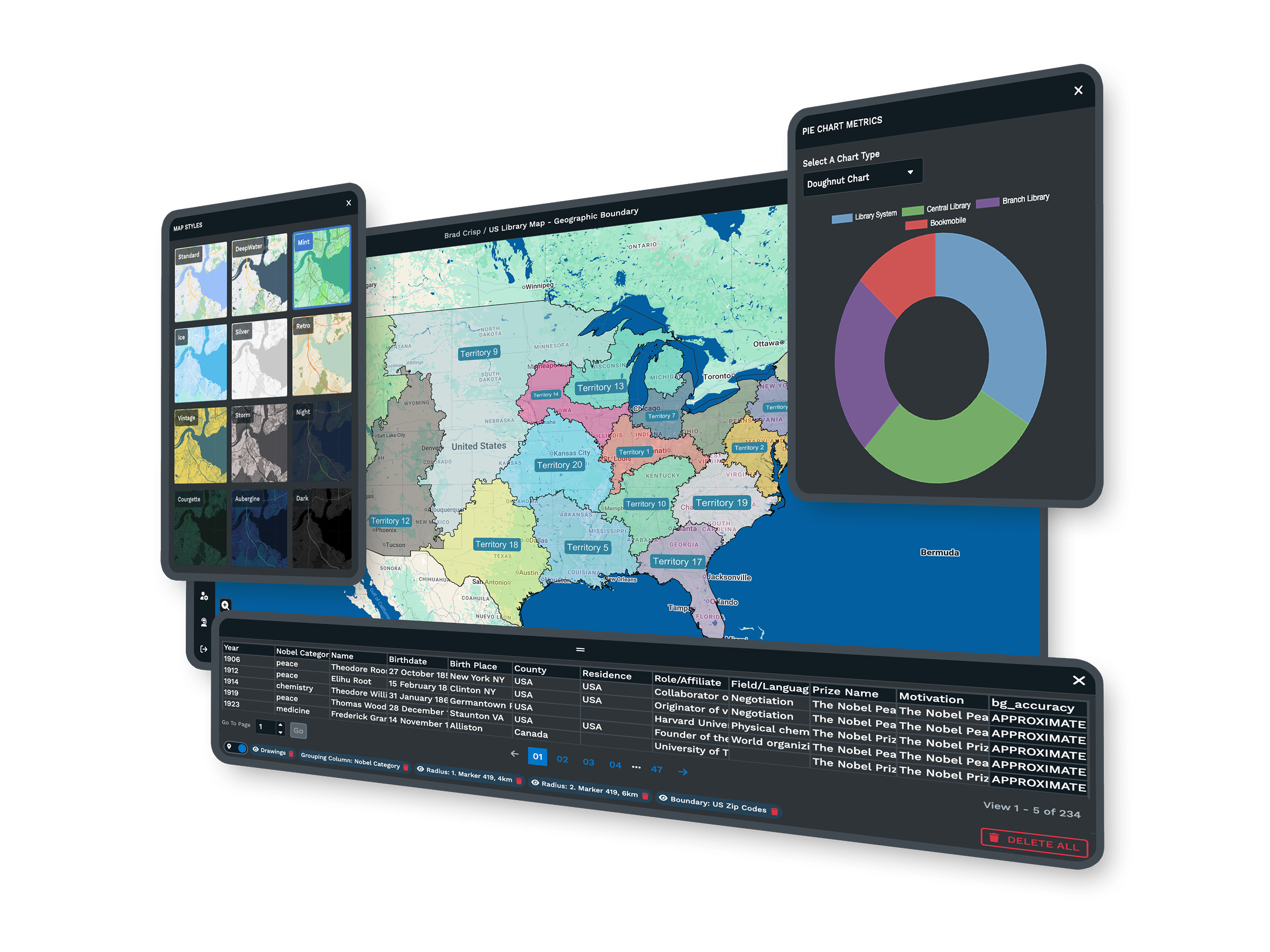
| 01 | Automated Territory OptimizationThe optimizer reads rep locations, account density, revenue potential, and drive-time limits, then builds balanced regions on its own. Work that used to fill a week finishes in minutes. |
| 02 | 200,000 Accounts on One MapWebGL rendering holds more than 200,000 markers without slowing the browser. Your full account base and prospect list load on one interactive map, however large the team. |
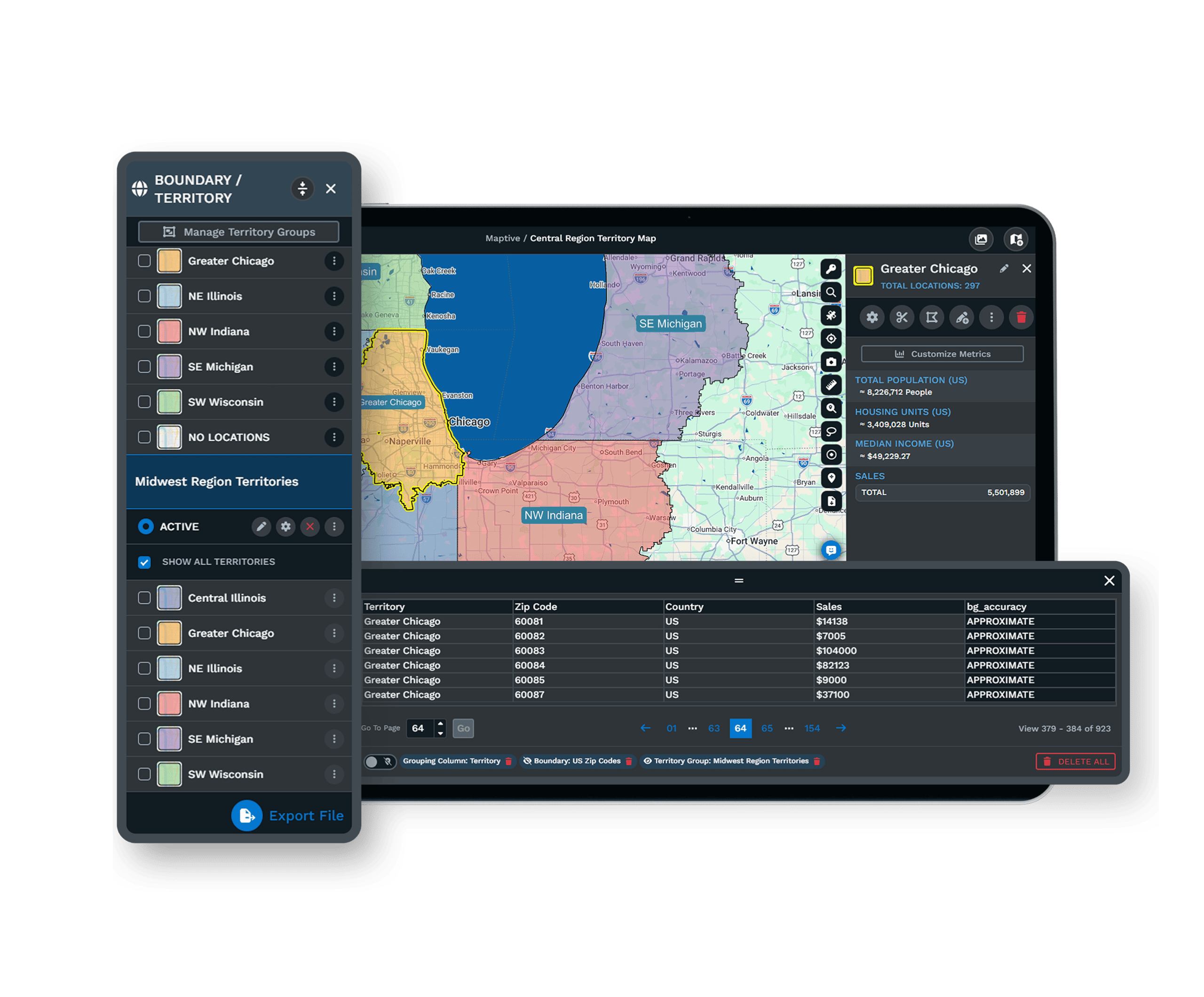
| 03 | Boundaries Built From Real GeographyBuild from states, counties, ZIP codes, and census tracts, or draw your own shapes by hand. Every line follows precise geographic data rather than a rough guess on a printed map. |
| 04 | Census Data on Every PlanMore than 50 census variables sit under every account, from household income to population density, at five geographic levels. Plans balance against real demand, not pipeline numbers alone. |
| 05 | Every Feature on Every PlanAll 60+ mapping and analysis tools come with every plan, with no feature gates or premium add-ons. Your purchase decision comes down to what your team needs, since every tier carries the same toolset. |
Build, Then Rebalance
From Spreadsheet to Territory Map in Minutes
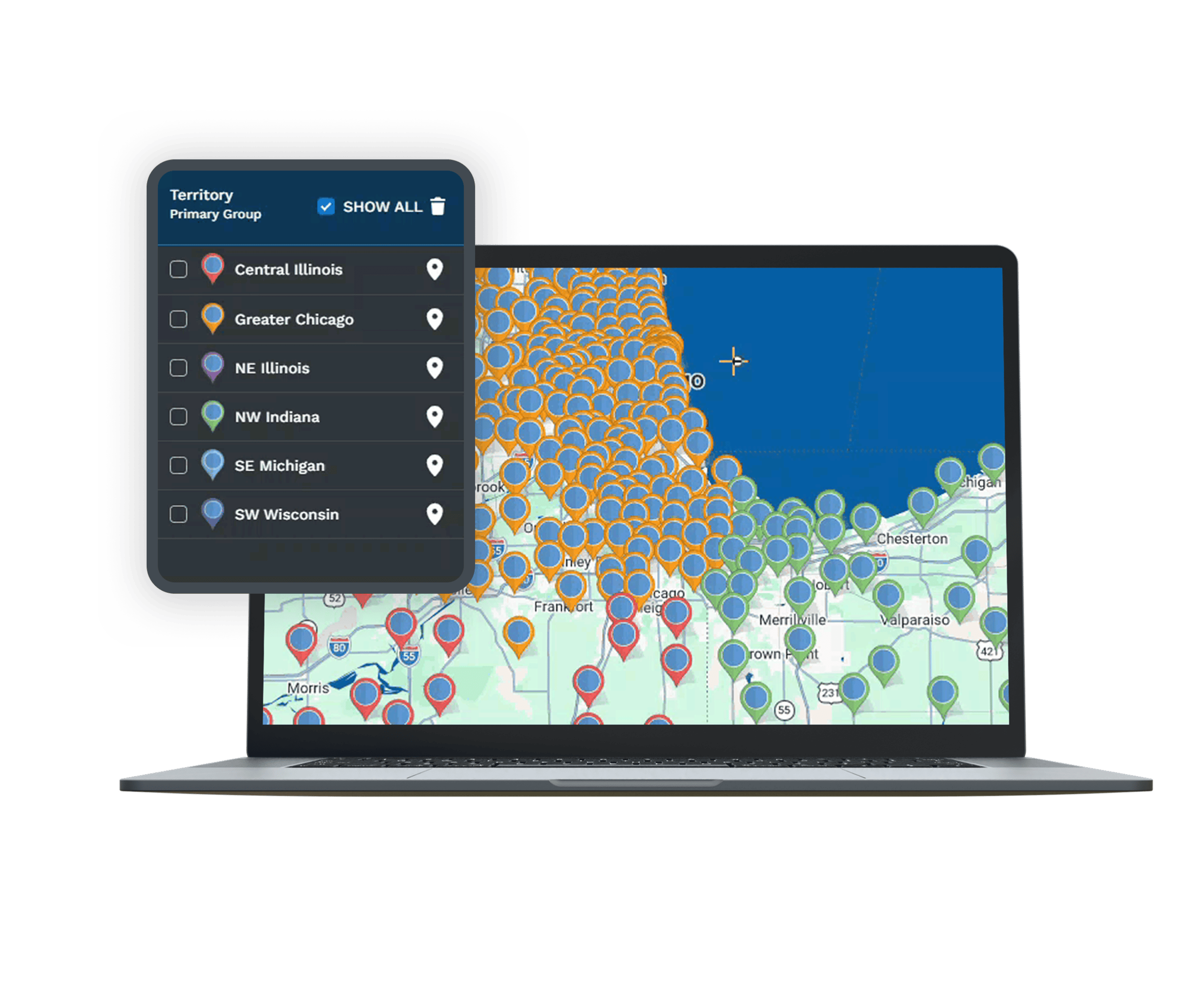
Upload an Excel file, a CSV, or a live Google Sheet, and the geocoding engine plots every account, correcting missing ZIP codes and inconsistent fields as the data loads. From there the optimizer reads the factors you weight and distributes accounts so no region carries twice the load of the one beside it. Drag any boundary to fine-tune, and the workload updates on screen as you adjust, so a plan that fits your team is minutes of work rather than days.
Rebalancing Without Starting Over
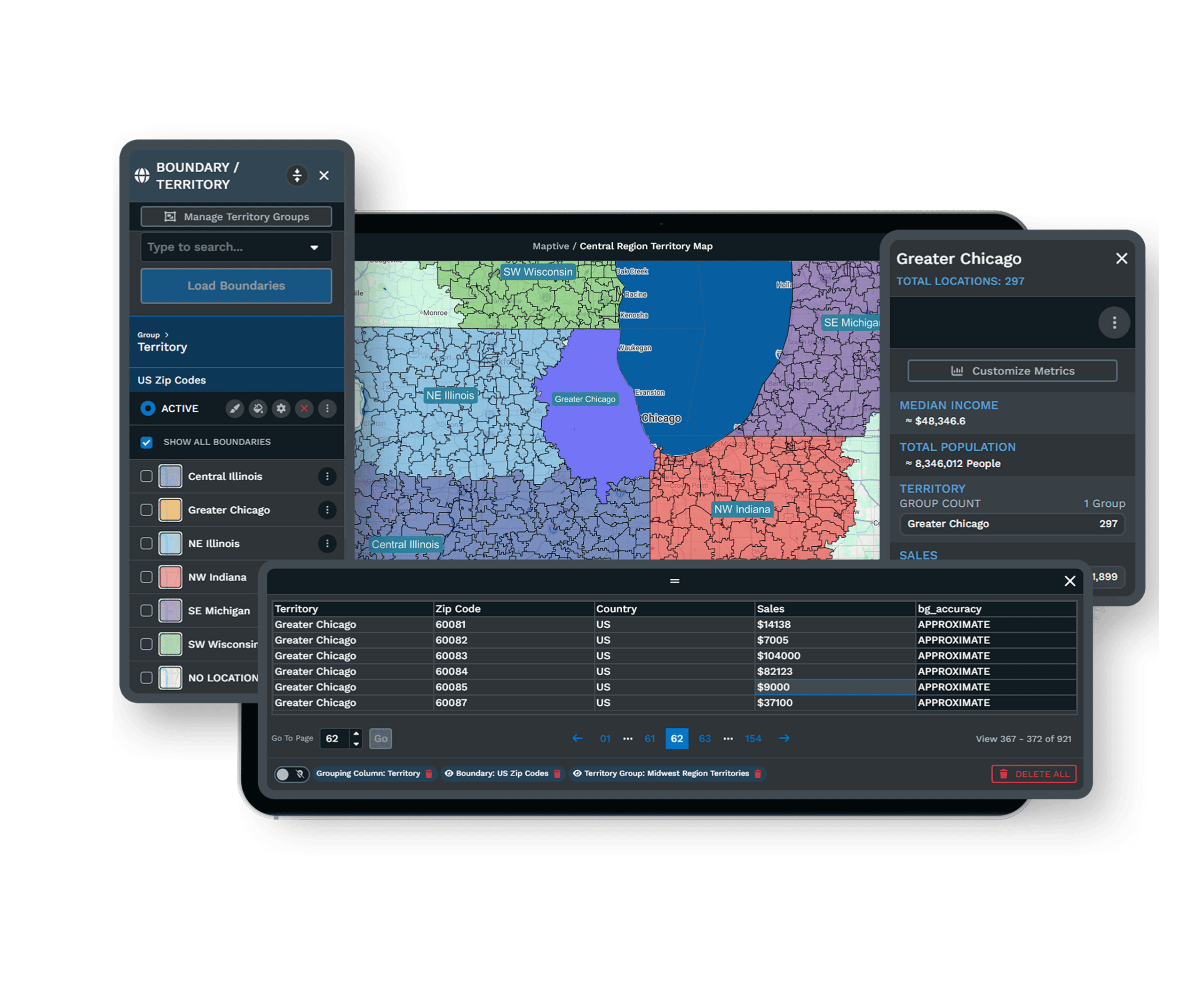
A plan that looked even in January rarely stays even by April. A rep leaves, a region outgrows its quota, or headcount moves. Maptive recalculates against current data whenever your inputs change, so rebalancing is a quick edit rather than a rebuild. Managers can test a change before publishing it, splitting a region, merging two, or adding a rep, and see the workload effect before it goes live. The change happens on the map, in front of the team, with the data visible to everyone in the room.
Enterprise Sales Teams Already Onboard
Enterprise Names Already Mapping
Amazon, General Electric, the US Department of Energy, and Coca-Cola run territory work on Maptive, each after clearing its own procurement and security review. For a mid-market team, that history is a useful reference point, since the platform has already passed standards stricter than most buyers apply.
Security Your IT Team Can Approve
Maptive secures your data with 256-bit SSL encryption, two-factor authentication, single sign-on, role-based access, and audit logging, with 99.9% uptime and no major outage on record in 2025. Data stays encrypted in transit and at rest, with permissions set down to the individual user.
Support That Knows Sales Operations
The US and Canada support team answers the phone, chat, or email in under 15 minutes, with a 9.7 out of 10 rating on G2. They clean your data, set up your first map, and walk your team through the workflow, so help arrives on the Thursday before quarterly planning closes.
Explore Every Territory Management Workflow
Discover the many ways sales teams use Maptive to plan, balance, and share territories.
Build Territories by ZIP
Group and color ZIP codes into sales rep areas and turn your whole spreadsheet into a live map fast.
Learn more →Build by County or State
Color counties or states and merge them into clean rep territories without wrestling any boundaries.
Learn more →Build by Drive-Time Area
Build territories from real drive-time or radius rings that follow the road network, not rough circles.
Learn more →Map Global Postcode Zones
Build territories from UK, Canadian, and other postal codes so a global team plans on one shared map.
Learn more →Draw Custom Territories
Draw territory lines by hand on the map when a region needs a shape the data on its own cannot guess.
Learn more →Auto-Build Territories
Auto-generate balanced territories from ZIP, county, or state blocks instead of drawing each by hand.
Learn more →Split a State by Region
Cut a large state into clean north and south or east and west halves and hand each part to a rep fast.
Learn more →Balance Rep Territories
Even out territories by revenue, volume, or workload so every rep gets a fair earning opportunity too.
Learn more →Re-Carve as Reps Change
Re-carve territories as reps join or leave and rebalance the accounts without rebuilding from scratch.
Learn more →Set Backup Coverage Zones
Set a primary and a backup rep for each zone so coverage holds when someone is out or a region shifts.
Learn more →Test Changes Before Live
Test a split, a merge, or a new rep on a copy of the map and see the workload effect before you commit.
Learn more →Fix Overlapping Zones
Find where two reps cover the same ZIP or account and clear the double coverage before it costs a deal.
Learn more →Plot Customers by Region
Plot your account list over colored rep zones so each rep sees the customers inside their own area now.
Learn more →Build Account Territories
Group named accounts into rep books that ignore geography, so ownership follows accounts not the map.
Learn more →Roll Up Sales by Region
Click a territory to read summed sales, account counts, and population rolled into one clean map popup.
Learn more →Reassign Reps on the Map
Move a ZIP from one rep to another right on the map and re-carve coverage without a fresh data import.
Learn more →Sync Territories to CRM
Map Salesforce or HubSpot accounts, balance them into territories, and sync each assignment right back.
Learn more →Export Rep Assignments
Send finished rep assignments back to Excel, CSV, or a Google Sheet to load into a CRM or billing tool.
Learn more →Share a Lookup Map View
Share a view-only map so staff can look up which rep covers any ZIP or county in a couple of seconds.
Learn more →Publish a Coverage Map
Publish a public coverage or pricing map on your site so visitors see which areas your team can serve.
Learn more →Free trial, full platform, no credit card
See Your Territories in Ten Minutes
The free trial runs ten days with no credit card, and every feature is unlocked, including the same 60+ tools, the 200,000-marker capacity, and the automated optimizer that enterprise teams run daily. Upload your data and build your first territory map on the full platform. Once everyone has seen the output, the budget conversation gets easier.
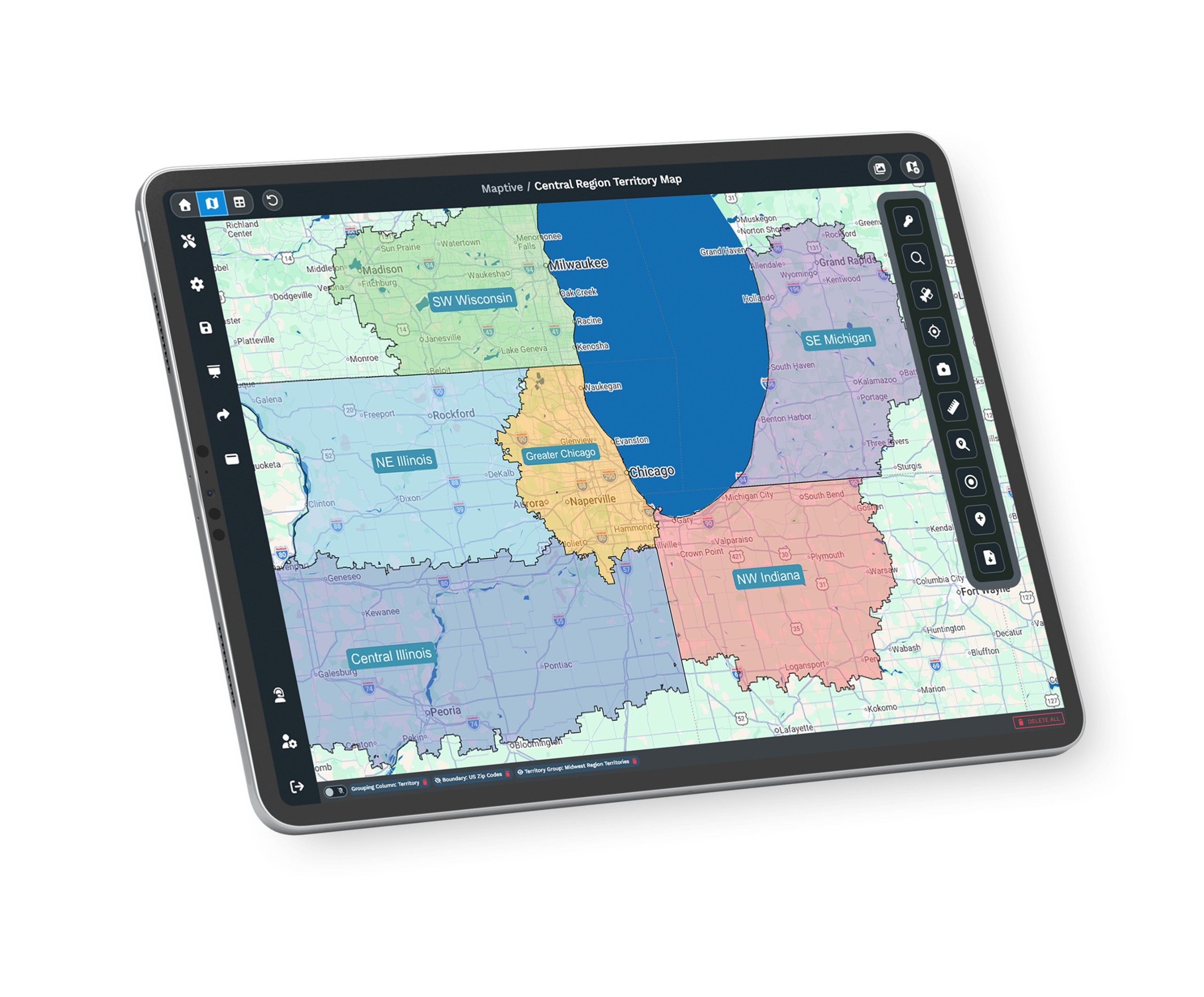
See It on Your Accounts First
If you want to see the platform on your own accounts before running a trial, a Maptive specialist will walk through your territory challenge and show how the optimizer handles it. This is the path for teams that need stakeholder alignment first, or that are evaluating tools across a committee. Bring your questions about data, security, and rollout, and the session works through your real scenario rather than a generic demo.
Frequently Asked Questions
What is territory management software?
Territory management software turns a list of accounts into balanced, mappable sales regions. Maptive plots your customer and prospect data on an interactive map, then builds territories from rep locations, account density, revenue potential, and drive-time limits. Sales operations teams use it to spread workload evenly, cut travel, and give leadership a view of coverage they can act on. None of it requires a GIS analyst, so the work starts the day you upload a file.
How does Maptive build sales territories automatically?
Maptive's automated optimizer reads the fields you choose, including rep home locations, account density, revenue, workload, and drive-time limits, then generates balanced territories in one session. You set the rules that matter to your team, and the engine distributes accounts so no region carries twice the load of the one beside it. From there you drag any boundary to fine-tune it, and the workload recalculates as you adjust, so a fitting plan is minutes of work, not days.
How long does it take to set up territories in Maptive?
Most teams have a working territory map within their first session. You upload an Excel file, a CSV, or a Google Sheet, the geocoding engine plots and cleans the data, and you build from built-in boundaries or the automated optimizer in minutes. There is no multi-week implementation, no data migration project, and no specialist required. A sales operations lead can move from a raw spreadsheet to a balanced territory map the same afternoon, then refine it from there.
Can Maptive balance territories fairly across reps?
Yes, and balancing is the core of the optimizer. You weight the factors that define fairness for your business, such as account count, revenue potential, workload, customer density, and drive-time, and Maptive distributes coverage so each rep carries a comparable share. You can preview the split before publishing it, then adjust any boundary by hand. Teams report planning time down 75% and far fewer overloaded territories once the balancing runs on real account data rather than a manual guess.
Can I build territories from ZIP codes, counties, or custom regions?
Yes. Maptive builds territories from states, counties, ZIP codes, and census tracts, or from shapes you draw by hand for regions that do not follow standard lines. You can combine boundary types in one plan and convert boundaries into editable polygons, so the territories match how your business already thinks about coverage. Every line is defined by real geographic data, so the plan holds up when you hand it to finance or the field.
What happens to territories when a rep leaves or a region grows?
Territory plans break when a rep leaves, a region outgrows its quota, or headcount changes. Maptive recalculates against current data whenever your inputs move, so rebalancing is a quick edit rather than a full rebuild. You can test a change first, splitting a region, merging two, or adding a rep, and see the workload effect before anything goes live. The change happens on the map in front of the team, with the downstream impact visible before it becomes official.
Can Maptive handle a large field sales team?
Yes. Maptive renders more than 200,000 markers on a single map with WebGL, so a full account base loads at once rather than in regional batches. Role-based access, single sign-on, and audit logging keep a large team organized and the data secure. A team of 10 reps and a team of 500 use the same tools on the same platform, which is one reason enterprises like Amazon and General Electric run their territory operations on it at full scale.
What demographic data is included for territory planning?
Maptive includes more than 50 US Census variables at state, county, ZIP, tract, and block-group levels, covering household income, population density, age, and household composition. The census data comes on every plan with no add-ons, and a growing library of market data categories sits alongside it. Planning against real market demand, rather than internal pipeline alone, is what keeps a territory balanced by opportunity, so a region with room to grow is not mistaken for one that is already full.
Can reps see only their own territory?
Yes. Role-based access controls let you set what each person can view, edit, or export. A rep opens a map of their own accounts and route, while managers keep full visibility across the organization. That separation keeps each rep's view focused and protects sensitive territory data from reaching the wrong account. You can also send a shared map link with viewer-only permission, so leadership or a partner reviews coverage without gaining the ability to edit the underlying plan.
Does Maptive work with my CRM data?
Yes. You can export accounts from any CRM to Excel or CSV and import them directly, and Maptive also offers direct integrations that sync records and keep maps current as the data changes. Your CRM stays the system of record for account details, while Maptive becomes the system of record for territory strategy. The two work together, so the territories you draw match the same accounts your reps manage every day rather than a stale snapshot.








